
Setting up high availability
This document describes how to connect a second ZeroPortal node as a replica to an existing server, what the two nodes do in operation, how to update a cluster, and what to do on a failure. It assumes a server is already installed (see Administration Handbook, chapter 3) and goes deeper into that handbook's chapter 11.
1. What is this?
ZeroPortal has two roles. The Primary is the node whose database writes: every change in the portal, every device registration, and every licence booking lands here. A Replica keeps a continuously updated copy of this database and delivers packages and policies to clients from it. Every freshly installed node starts out as a standalone Primary; a Replica comes into being when a second node joins the first with an invitation token.
The copy comes from MariaDB's binlog replication: the Primary writes every change to its binary log, the Replica reads that log and applies it to its own database. Three things deliberately stay per node and are not replicated: node configuration (role, node ID, maintenance mode, LDAP settings), the list of registered nodes, and the App-V reporting tables. Only the Primary therefore accepts App-V reports; a Replica forwards them there.
A Replica is fully usable day to day. Reads always come from the local copy. The node quietly forwards writes to the Primary; there is no read-only mode and no persistent notice. Only when the Primary is unreachable does the yellow bar No Primary reachable appear on every page.
The Primary checks every registered node every 10 seconds through its health endpoint. Each Replica reports to the Primary by heartbeat every 5 minutes; if a heartbeat fails, it retries every minute. You see both under Global Configuration → High Availability.
2. What is this good for?
- A server fails or is under maintenance. Clients keep syncing with the other node: MSIX packages, App-V packages, and policies come from the local copy. For that, both server URLs must be in the Publishing servers group policy; if the first is unreachable, the agent switches to the next after 10 seconds and avoids the failed one for 10 minutes (see Administration Handbook, chapter 11).
- Updates without a delivery gap. You update the nodes one after another; while the Primary restarts, the replicas keep serving clients, and vice versa.
-
Fast recovery. If the Primary fails for good, use the wizard to promote a replica to the new Primary. The data is already there.
-
Load balancing for the sync. Turn on Random server selection in the agent's group policy, and each agent shuffles its order and picks the first reachable node. Syncs then spread evenly over the Primary and the replicas, with no load balancer and no shared DNS name. Leave the setting off, and every agent works the list in the same priority order: the first node then carries the load, the others stand by for a failure.
What a replica does not speed up is writes: they always end up at the Primary, the Replica only forwards them. If the Primary is missing, this mainly affects you as the administrator: changes in the portal, newly added devices, and licence bookings wait until it is back or a replica has been promoted. Users notice nothing, their sync keeps running. The one exception is App-V reporting: client reports are writes too, and wait along with the rest. There is no automatic role switch.
A single node, by the way, also carries large fleets; sizing guidance is in the Administration Handbook, chapter 2. Load balancing is a welcome side effect of high availability, not a reason on its own for a second node.
3. The moves in short
Everything runs through Global Configuration → High Availability on whichever node is named. No SQL, no command line. The detailed paths are in the sections that follow.
Adding a second node
- On the Primary: Generate new token, copy the token.
- On the new node: Set up as replica…, enter the Primary's URL and the token, Join as replica.
- On the new node: Start wizard…. It sets up database replication on both sides and fetches the existing data at the end.
The Primary has failed
Don't rush. Clients keep being served by the replicas, packages and policies arrive unchanged. Only changes in the portal, new devices, reports, and licence bookings wait. If the Primary comes back soon, the replicas catch up the gap on their own.
Making a replica the Primary
If it doesn't come back, promote a replica. Two clicks, a bit over a minute:
- On the replica: Reset / promote to Primary → Promote to Primary…, confirm. The data is already there, nothing gets copied.
- Reconnect the remaining replicas: promoting clears the node list. On the new Primary, generate a token and let each replica join as above.
You do not need to touch the agents, as long as the new Primary's address is in the group policy's server list. They switched to a reachable node long ago.
Bringing the old Primary back
It returns as a replica: generate a token on the new Primary, on the old node Set up as replica…, run the wizard. Its stale database gets overwritten in the process.
Replication is stuck or has broken off
On the replica: Advanced / manual setup, Replica tab, Full Sync from Primary…. This is the standard fix for any discrepancy, even after a longer outage.
Updating nodes
Primary first: install the MSI, then run the database update on the same node. Only after that the replicas, one by one, each in Maintenance mode first. Reason: schema changes happen on the Primary and reach the replicas through replication; a replica updated first simply keeps running on the old schema until then.
4. Setting it up, step by step
All steps happen in the portal under Global Configuration → High Availability; you need level Manage in the High Availability area, or a full administrator account (see Users, permissions, licences and logs).
4.1 Prerequisites
- A second server installed (Administration Handbook, chapter 3) with its own MariaDB, ideally the same ZeroPortal version and the same database name; joining checks this and refuses otherwise.
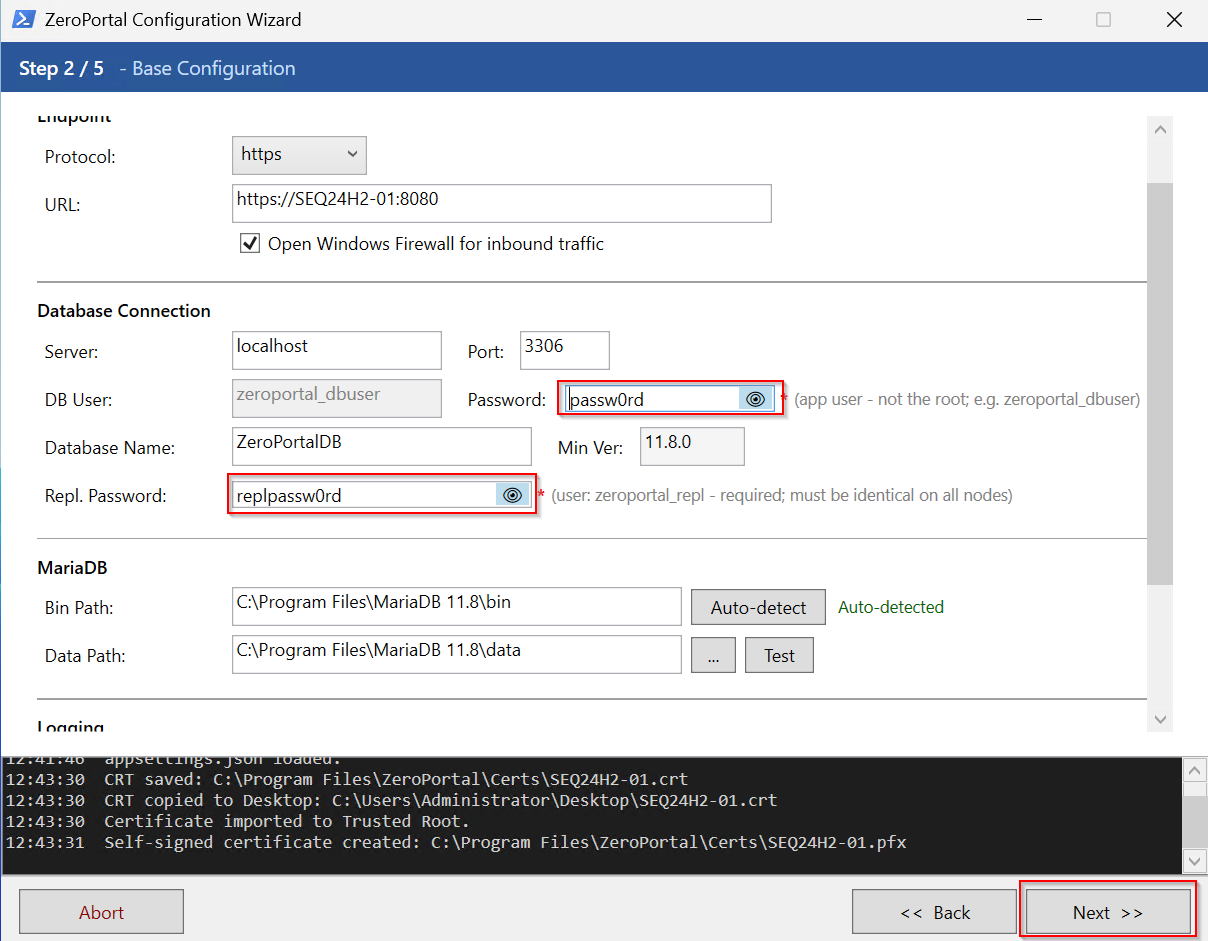
- Configuration tool, step 2 - Base Configuration, on both nodes: Repl. Password
identical (password of the database user
zeroportal_repl); Bin Path filled by Auto-detect, otherwise the wizard won't findmy.ini. - Step 4 - Database Install / Update on both nodes with the database
administrator account: this is when
zeroportal_replis created and its password set. Repeat this on both nodes after every change to the replication password. - Network: the portal port (HTTPS, e.g. 8080) open in both directions between the nodes; TCP 3306 from the replica to the Primary. The wizard creates the Windows Firewall rule for 3306 itself; open hardware firewalls and security suites by hand.
- Existing data: if the Primary already holds packages, the replica needs a one-time full sync (section 4.5). If it has no package data yet, the wizard starts it on its own.
4.2 Generate an invitation token on the Primary
On the Primary: Global Configuration → High Availability → Invitation token
section → Generate new token → Copy. Note the Primary's base URL with port
while you're there, e.g. https://portal1.example.com:8080.
The token is valid for 24 hours and for exactly one join; a new token invalidates an existing one.
4.3 Let the second node join
On the future replica node, open the same page (it still shows as Primary):
- Set up as replica… → enter the Primary's base URL → Test. The response names the Primary's role and database name; if the test fails, the URL, port, certificate, or firewall is wrong.
- Paste the invitation token. This node's base URL is pre-filled; that is the address the Primary reaches this node at.
- Join as replica. Under This node, the role now reads Replica; on the Primary, the node appears under Registered nodes with Replication: Not started. The database is only coupled by the next step.
4.4 Run the HA setup wizard
The wizard sets up MariaDB replication on both nodes (my.ini, firewall, database
service restart, coupling). You start it on the replica:
- In the Replication wizard section, click Start wizard…. The HA Setup Wizard window shows the planned steps and four fields:
| Field | Meaning |
|---|---|
| Primary DB host | Host or IP of the Primary's MariaDB (pre-filled from the base URL) |
| Port | MariaDB port of the Primary, default 3306 |
| Primary ID | server-id of the Primary; convention 1. Only change it if the Primary was recently promoted and its my.ini still carries a different ID |
| Server ID of this node | unique value ≥ 2, suggested from the node ID; must differ from the Primary ID |
- Confirm Start wizard. The wizard shows each of its steps with its result. If
something goes wrong, it rolls the
my.iniback on both nodes and stops; if only a firewall step fails, it carries on. - Close the window. If the replica had no package data yet, the full sync starts right away instead (section 4.5).
While the wizard runs, the Primary is without a database for a few seconds (MariaDB restart). Plan the setup for a quiet time.
4.5 Full sync: copying existing data to the replica
Replication only carries changes from the binlog position it started at. Full sync fetches a complete dump from the Primary, imports it locally, and starts replication from exactly the position the dump belongs to.
- Automatically at the end of the HA setup wizard, if the replica has no package data yet; the page announces this beforehand.
- By hand: Advanced / manual setup → Replica tab → Full sync from Primary…. The dialog takes the Primary's host and port from the same tab.
The whole local database content is replaced, the portal on this node is briefly unreachable, and the process cannot be undone. Node configuration, the node list, and the App-V reporting tables are excluded from the dump; the replica keeps its role and node ID.
A full sync is needed again later if a replica has been disconnected from the Primary for more than seven days, was restored from a snapshot, or its SQL thread has stopped over conflicting data (section 6.4).
4.6 Check the result
- Registered nodes on both nodes: green dot, the replica's Replication column reads
OK: <date>or0 s: <date>. - Replica, Replica tab → Refresh status: IO running: Yes, SQL running: Yes, Lag (s): 0, Last error empty.
- Enter both server URLs in the Publishing servers group policy (see Client agent: operations and rollout).
5. Rules: when does what apply
5.1 What gets written where, and when
| What | Rule |
|---|---|
| Reading packages, policies, assignments (agent sync) | locally on every node |
| Changes in the portal, enrollment, licence booking, audit, App-V reports | Replica forwards to the Primary; fails after 5 s, then a 30 s fast-fail, then retries |
| Role, node ID, maintenance mode, LDAP settings | per node, not replicated |
| List of registered nodes | Primary is authoritative; a replica's page asks the Primary live |
| Primary checks every registered node | every 10 s; the Registered nodes display too |
| Replica heartbeat | every 5 min, every minute after a failure; overdue after interval + 1 min |
| Invitation token | 24 h, one-time |
| IO thread "Connecting" after a Primary restart | tolerated up to 10 min, then the Database replication stopped alarm fires |
| Binary log on the Primary | 7 days; a replica missing longer needs a full sync |
Leave the Write routing switch under This node on a replica set to Active. Disabled silently drops every forwarded write; it is a diagnostic switch only.
5.2 Status indicators under Registered nodes
The dot sums up the state (maintenance over reachability over replication), the tooltip names the cause: Blue maintenance mode; Green reachable, fresh heartbeat, lag under 60 s; Yellow temporary (node not responding but heartbeat fresh; heartbeat overdue; lag 60–299 s); Red action needed (unreachable and heartbeat overdue; SQL thread stopped; lag 300 s or more; on a replica: Primary unreachable); Grey not checked yet.
Replication column: OK: <date> or <n> s: <date> = both threads running, n seconds
behind; IO stopped → sections 6.3 and 6.4; SQL stopped → end maintenance or section
6.4; Not started → HA setup wizard (on the replica, the text is a link). Only a
stopped SQL thread turns the dot red. After a Primary restart, MariaDB reports the IO
thread as "Connecting" and reconnects on its own; only a real error (invalid binlog
position 1236, wrong replication password, TLS) stops it.
5.3 Maintenance mode
Maintenance mode pauses the SQL thread on a replica: changes from the Primary keep arriving but are not applied until maintenance ends. The dot turns blue, the node stays reachable for clients. Meant for work on the replica where the database should not be running (updating program files, maintaining MariaDB).
- On the Primary, the Maintenance column switches per node between On and Off; All in maintenance and Resume all apply to every replica.
- Off starts both replication threads. Resume all is therefore also the easy way to restart a stopped replication.
- The Primary's own maintenance mode has no effect on replication.
5.4 If the Primary fails
| Replica without a Primary | |
|---|---|
| Portal on the replica | answers normally; tasks that need the Primary retry in the background |
| Delivery (MSIX, App-V, policies) | keeps running, reading is local |
| Administration, enrollment, reports, licence booking | wait; every write fails after 5 s, then fast-fails for 30 s, then retries |
| Visible as | No Primary reachable bar on every page (with a timestamp); /api/health/status returns primaryReachable: false; email Primary not reachable (sent by the replica) |
| Detected | at the next heartbeat, or right away on the first forwarded write; heartbeat every minute after that |
| Primary returns | on its own; email Primary reachable again and an audit entry Cluster.PrimaryRecovered with the outage window |
| Primary does not return | promote a replica, section 6.2 |
The Primary cannot report its own failure; this one message is sent by the replica, every other cluster message comes from the Primary.
Limits: exactly one Primary, any number of replicas, each with its own server ID; no automatic failover — promotion is a deliberate step by the administrator; more than 7 days disconnected, or a snapshot rollback of the replica, needs a full sync.
5.5 Removing a node
- On the Primary: the bin icon in the last column. Removes only the entry in the node list; the replica notices at its next heartbeat (5 minutes at the latest) and resets itself to a standalone Primary.
- On the replica: Remove next to the Primary URL under This node. The node becomes a standalone Primary right away and signs off from the former Primary.
Either way, MariaDB replication keeps running. If the node should not rejoin the
cluster, afterwards run Advanced / manual setup → Replica tab → Reset replica
(RESET REPLICA ALL) on it, or run the promotion wizard (section 6.2), which also sets
server-id to 1.
6. Operations and troubleshooting
6.1 Updating the cluster
Schema changes happen on the Primary and reach the replicas through replication;
ZDBInstallUpdate still runs on every node, because that is where it syncs the
node-local tables.
- Primary: install the MSI, then run the database update:
"C:\Program Files\ZeroPortal\ZDBInstallUpdate.exe" "C:\Program Files\ZeroPortal\appsettings.json" --admin-user root --admin-password <password>Check or start theZeroPortalservice. The replicas keep running on the old state. - Replicas, one after another: install the MSI, run
ZDBInstallUpdatewith the same command line, check the service. Expected message there:Schema migration skipped on this replica (deferred to the Primary)andLOCAL_TABLES: …. - Check: the Primary's HA page, every node green, Replication column
OK; the version in each node's footer.
The configuration tool does the same in step 4 - Database Install / Update. A replica
accidentally updated first reports REPLICA_SCHEMA_DEFERRED=1 (exit code 19) and keeps
running on the old schema until the Primary catches up; replication stays intact. For a
MariaDB update, the order reverses (replicas first, Primary last; Administration
Handbook, chapter 12).
6.2 Primary lost: promoting a replica
The click path is in section 3. Three things that don't fit there:
- Picking the right replica. With several replicas, take the one with the smallest lag: Advanced / manual setup → Replica → Refresh status, field Lag (s).
- What the wizard does. Stops and resets replication, sets the role to Primary,
clears the node list, writes
server-id = 1intomy.ini, restarts MariaDB, checks. The node then sends the message Failover: this node became Primary. - The old Primary must not simply come back up. It still considers itself Primary
and would accept changes the new one never sees. Before switching it on, disable the
ZeroPortalservice or take the server off the network; then connect it as a replica and overwrite it with a full sync.
A DNS alias or load balancer pointing at the old Primary needs updating. The agents need no change, as long as both addresses are in the Publishing servers policy.
6.3 After a hard failure of the Primary
If the Primary was switched off without a clean shutdown, the replicas afterwards sometimes show IO stopped with `Got fatal error 1236 … start replication from position
file size`: the replica remembers a binlog position that no longer exists after the restart. Resume all does not help here; the fix is Full sync from Primary… on the affected replica. To prevent it: shut the Primary down cleanly, or at least stop the MariaDB service first.
6.4 Restarting or resetting replication
| Situation | Fix |
|---|---|
| SQL stopped after maintenance | End maintenance mode (Off or Resume all) |
| SQL stopped or Stopped for no clear reason | Resume all on the Primary, or START REPLICA; on the replica |
Last error Duplicate entry, Can't find record, doesn't exist |
The replica has conflicting data (the Replica tab shows A full sync may be needed): Full sync from Primary… |
IO stopped with Access denied |
Replication password does not match between nodes: set it the same on both nodes in configuration-tool step 2, run step 4 on the Primary, restart the HA setup wizard |
| IO stopped with error 1236 | Section 6.3 |
| Reset replication completely | Replica tab → Reset replica (RESET REPLICA ALL), then the HA setup wizard |
6.5 Backing up my.ini
The wizard and promotion write to MariaDB's my.ini (in the data folder next to
bin, or my.cnf) and first save my.ini.zeroportal.bak next to it; every further run
overwrites that copy. Back up the state before HA setup yourself beforehand.
Restore: Advanced / manual setup → my.cnf tab → Restore backup, then Restart
on this node (MariaDB service).
6.6 Logs and messages
Portal log: C:\ProgramData\NickIT\ZPServer\Logs\ZeroPortalLogs.log (older installs:
C:\Windows\Temp\ZeroPortalLogs); the Warning level shows only transitions and
errors, detail only at Information (configuration tool, step 2, Log level; turn it
back down afterwards). Cluster lines start with NodeReachability:, PrimaryLink:,
Heartbeat:, HA:, SetupWizard:, and PromoteWizard:. Set up email notifications
(appendix 7.4) under Global Configuration → Configuration → Email notifications; every
one also lands in the Audit log as Alert.Raised. For monitoring without signing in:
appendix 7.5.
6.7 Common errors
| Symptom | Cause | Fix |
|---|---|---|
| Test on joining fails; yellow dot with SSL certificate validation failed | URL, port, portal port blocked by a firewall, or an untrusted certificate | Check the URL and port; set SslSettings:IgnoreSslErrors in appsettings.json to true (default), or use a trusted certificate |
| Joining: Database name mismatch | Database name differs between the nodes | Create a database with the same name on the replica (configuration tool, steps 2 and 4) |
| Joining: No valid invitation token / Invalid invitation token | Token expired (24 h), already used, or copied wrong | Generate new token on the Primary |
| Joining: Cannot join itself | The Primary URL points at this node | Enter the other server's URL |
Wizard: my.cnf not found; server_id stays old after promotion |
Bin Path missing in appsettings.json, or MariaDB was moved |
Configuration tool, step 2, Auto-detect, save, restart the service; if needed, set server-id = 1 by hand and restart MariaDB |
Wizard: timeout at Wait for Primary MariaDB; IO running: No with error connecting |
Port 3306 to the Primary is blocked, or bind-address = 127.0.0.1 |
Test-NetConnection <primary> -Port 3306; check the my.cnf tab on the Primary; check the DB host in the wizard |
| Wizard: Server-ID conflict | Both nodes carry the same server-id |
Pick a different Server ID of this node in the wizard |
| Wizard: Could not fetch binlog position | log_bin is off on the Primary, usually because MariaDB was not restarted after writing my.ini |
my.cnf tab → Restart on Primary |
IO running: No with Access denied; SQL stopped with Duplicate entry; error 1236 |
see section 6.4 | Section 6.4 |
| Yellow dot, tooltip Heartbeat overdue | The replica hasn't checked in for longer than interval + 1 min | Check the replica's service and network; it clears within a minute after a Primary restart |
Service won't start on a replica after the update, log shows Unknown column |
ZDBInstallUpdate was not run on the replica |
Section 6.1 |
| Manual: Get binlog position from Primary reports Access denied | The button uses the local app credentials; on the Primary the password differs, or the user lacks BINLOG MONITOR |
Use the HA setup wizard (it uses zeroportal_repl), or run configuration-tool step 4 on the Primary. The error text names zeroportal_app; that means the app user from the connection string, zeroportal_dbuser by default |
| No Primary reachable bar on the replica | Primary down, network, or portal port | Section 5.4; if the Primary stays away: section 6.2 |
7. Appendix: technical reference
7.1 Entries in appsettings.json
| Key | Meaning |
|---|---|
ReplicationSettings:ReplPassword |
Password of the replication user zeroportal_repl; same on every node (configuration tool, step 2, Repl. Password) |
MySqlSettings:BinPath |
Folder with mysql.exe/mysqldump.exe; my.ini is looked for relative to it (step 2, Bin Path) |
MySqlSettings:DataPath |
MariaDB's data directory (step 2, Data Path) |
SslSettings:IgnoreSslErrors |
true (default): nodes accept each other's self-signed certificates |
Logging:Console:LogLevel:System.Net.Http.HttpClient.HaClient |
Warning: no line per heartbeat in the log; add this on older installs if the log grows from Start processing HTTP request |
Search order for my.ini, starting from Bin Path's parent folder: data\my.cnf,
data\my.ini, my.cnf, my.ini.
7.2 Firewall and service
Rule name MariaDB HA Replication (ZeroPortal) :3306, created only if missing:
New-NetFirewallRule -DisplayName "MariaDB HA Replication (ZeroPortal) :3306" -Direction Inbound -Protocol TCP -LocalPort 3306 -Action Allow -Profile Domain,Private
Service restart: service names MariaDB, MySQL, mariadbd in that order,
Restart-Service -Force.
7.3 ZDBInstallUpdate
"C:\Program Files\ZeroPortal\ZDBInstallUpdate.exe" "<path>\appsettings.json" --admin-user <user> --admin-password <pw> [--create-app-user] [--repl-password <pw>] [--check] [--force-migrate]
| Output / exit code | Meaning |
|---|---|
NODE_ROLE=Primary / Proxy |
Detected role of the node |
REPLICA_SCHEMA_DEFERRED=1, exit 19 |
Replica: pending schema changes come from the Primary; only node-local tables were synced |
LOCAL_TABLES: … |
Sync of the node-local tables |
| Exit 0 | Succeeded, or up to date with --check |
Exit 13 (only --check) |
Schema changes or a sync are pending |
| Exit 18 | Schema updated, but one node-local table could not be synced |
--force-migrate |
Apply schema changes locally despite the replica role (only if the Primary is lost); a full sync is needed afterwards |
7.4 Messages and audit
| Message | Sender | Trigger |
|---|---|---|
| Cluster node unreachable / Cluster node reachable again | Primary | A node's health endpoint stops or resumes answering |
| Database replication stopped | Primary | A replica's IO or SQL thread stopped, or the IO thread has been "Connecting" for more than 10 min |
| Primary not reachable (sent by the replica) / Primary reachable again (sent by the replica) | Replica | A heartbeat or a forwarded write fails, or succeeds again |
| Failover: this node became Primary | Promoted node | Promoted to Primary |
Audit entries: Alert.Raised for every message sent, Cluster.PrimaryRecovered with the
outage window.
7.5 PowerShell module and API
| Cmdlet | Purpose |
|---|---|
Get-ZeroPortalHealth [-TargetUrl <url>] |
Role, node ID, primaryReachable of a node |
Get-ZeroPortalReplicationStatus [-TargetUrl <url>] |
IO/SQL state, lag, last error of a replica |
Get-ZeroPortalClusterNode [-Name <pattern>] |
Node list of the connected node |
Remove-ZeroPortalClusterNode -NodeId <guid> or -Name <name> |
Remove an entry from the node list (same as the bin icon) |
Aliases: Get-ZPClusterNode, Remove-ZPClusterNode. Set the base URL first with
Set-AppvZeroPortalCmdLetConfiguration.
| Route | Authentication | Content |
|---|---|---|
GET /api/health/status |
none | Role, node ID, primaryReachable (replica only) |
GET /api/health/replication |
none | ioRunning, ioConnecting, sqlRunning, lagSeconds, lastError, lastIoError |