
Devices without a domain (API key)
1. What is this?
By default, ZeroPortal authenticates devices and users through Kerberos; a domain member needs no key management for that. This document describes the second path, for devices that do not belong to a domain — workgroup machines, a device in a branch office without a domain, a service provider's laptop.
You generate a rollout token in the portal. The token is not a secret — it only lets someone request their own key, so it may travel inside an installation command line. At the first sync, the agent trades it for a lasting machine key; a locally signed-in user also gets their own user key. That lets the device fetch packages and policies like a domain member, and it shows up in the portal under Known clients.
This path is experimental: it works, but it is meant for pilot installs and single devices, not a large rollout. It delivers MSIX packages in the user context; App-V, App Attach, and machine-wide installs are not possible on such devices (section 4.4).
2. What is this good for?
- Workgroup and standalone devices. Kiosks, trade-show laptops, lab machines — the same packages and policies as domain clients get.
- Devices in a DMZ or a branch office with no domain controller. HTTPS to the portal works, a Kerberos ticket does not.
- Service providers' laptops. A key of its own that you can revoke individually at any time, without touching the domain.
- Test environments. A fresh VM with no domain is connected in minutes.
One portal serves domain clients over Kerberos and key-based clients side by side.
3. How do I use this?
Prerequisites:
| Item | Detail |
|---|---|
| Network | The device can reach the portal's HTTPS port (e.g. 8080). Without DNS, a hosts-file entry is enough. |
| Certificate | The device must trust the portal's TLS certificate (section 3.2). |
| Package access | A read-only account on the package share (section 3.3). |
| Agent | The agent MSI from the portal (Downloads). |
3.1 Preparing the portal
On the Global Configuration → Agent enrollment page (full administrators only):
- On the Rollout tokens card, switch Key-based access on. As long as it is off, every enrollment and every issued key is refused.
- Create a token: Name (e.g. "Rollout site Hanover"), Valid (days) — defaults to 14,
allowed range 1 to 365 — and Create. The dialog shows the token value (starts
with
zpe_) and the finished install line (Roll out with the installer); the group policy variant is meant only for domain-joined devices. - Show token value reveals the value again later — on a high-availability installation, only on the node where the token was created.
- The table shows, per token, whether its enrollment window is open or closed and until when it applies. Reopen for 14 days extends an expired window and keeps the token value; Open/Close switches the window by hand.
By PowerShell (the server's module): Get-, New-, Set-, Remove-ZeroPortalEnrollmentToken,
plus Get- and Set-ZeroPortalApiClient.
3.2 Install the agent
The line from the token dialog contains the portal URL, the token, and the three sync
switches, which are off out of the box. For a self-signed portal certificate, append
TRUSTCERT=1; for a silent install, /qn:
msiexec /i ZeroPortalAgent.msi SERVER=https://portal.firma.tld:8080 ENROLLTOKEN=zpe_... MSIXSYNC=1 POLICYSYNC=1 TRUSTCERT=1 /qn
You can leave out APPVSYNC=1 — App-V cannot be used on such devices. These switches
are permanent: a later update without the parameters does not undo them.
Certificate. With TRUSTCERT=1, the service installs a portal certificate whose
chain it does not validate into the computer's trusted root store during the first
machine sync (trust on first use — only for servers from its own server list; a
regularly valid certificate is never touched; event 2013). Alternatively, import the
certificate by hand into the computer store — the browser's trusted sites are not
enough. Afterwards: Set-ZPAgentConfiguration -TrustServerCertificate $true.
What happens next. 30 seconds after the service starts, the first machine sync runs:
the agent uses the token to request a machine key (event 2510), and the device appears
under Known clients. During the user sync, a local user account fetches its own
key and appears under Known users as user@devicename.
3.3 Read-only account and package share
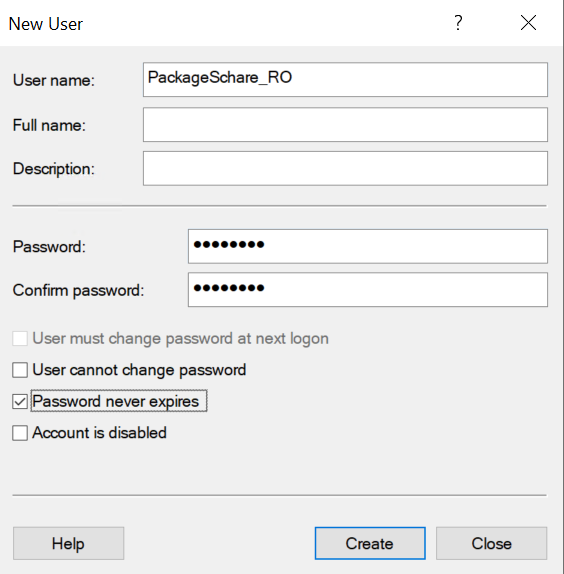
The device cannot read the package share with a domain identity. Do not set up anonymous access — instead, use a local account on the file server that is allowed to read only.
- Create a local account on the file server (e.g.
PackageShare_RO, password never expires):
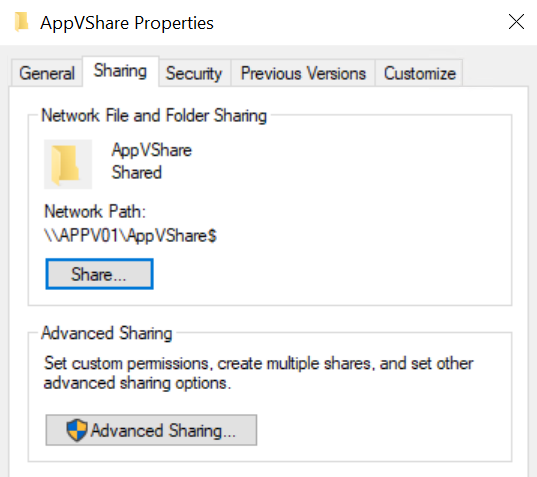
- Give this account the NTFS permission Read & execute on the package folder. At the share level, the Everyone entry from the Administration Handbook is enough (chapter 3, "Setting up the package share"):
3.4 Policy: SMB connection with credentials
The agent builds the connection to the share through a drive policy. The SMB session lasts the whole sign-in session; package delivery reaches the UNC path this way without a drive having to appear in Explorer.
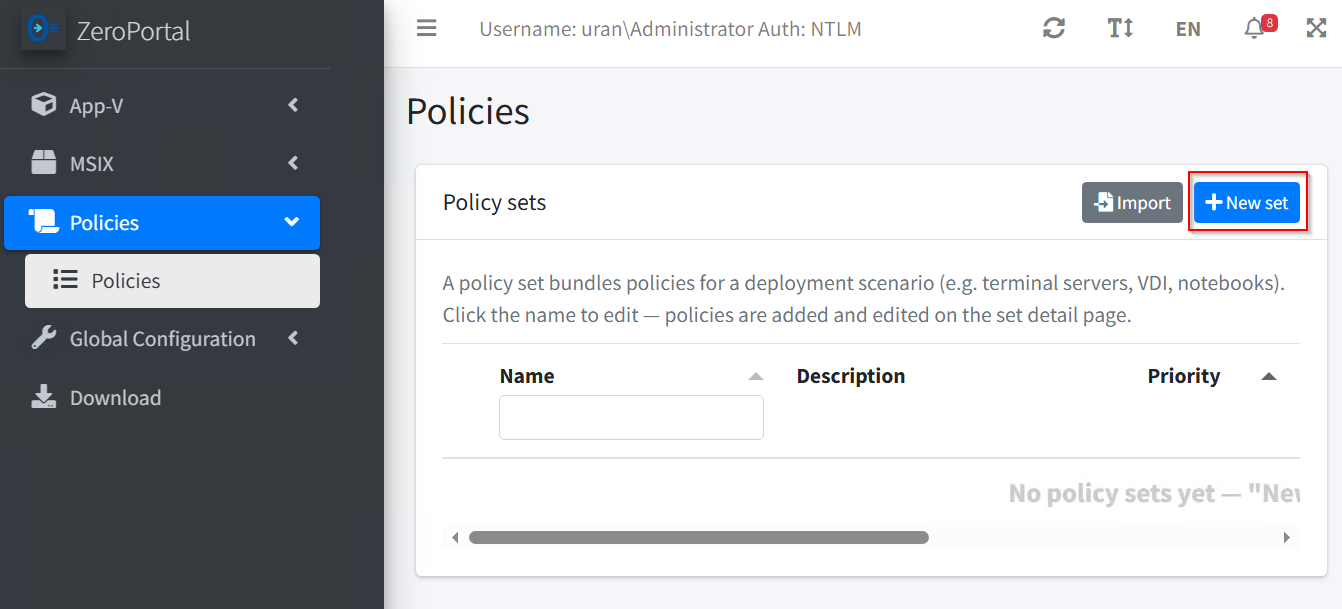
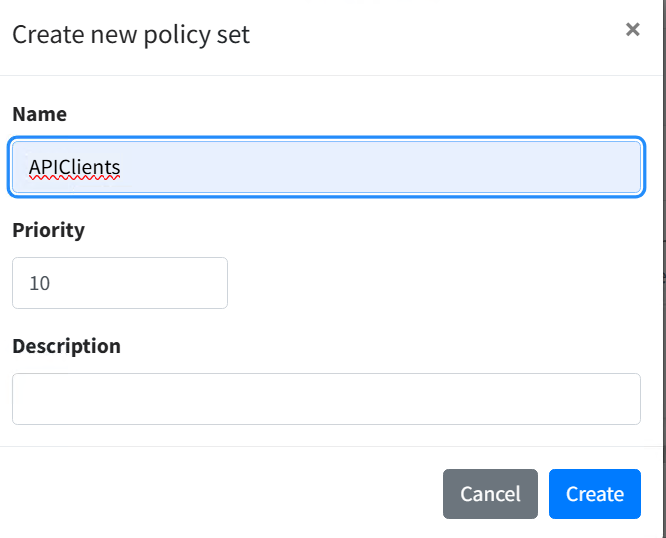
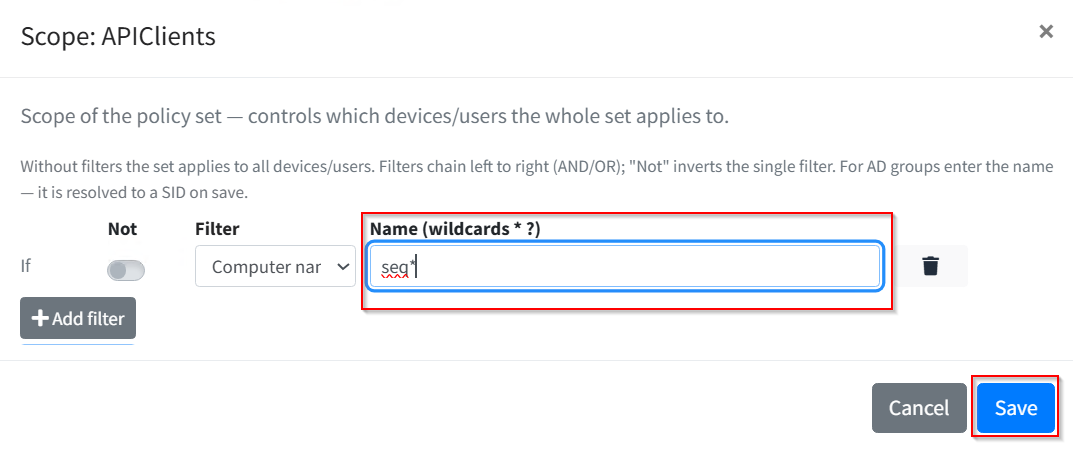
- Under Policies, use New set to create a policy set, e.g. "APIClients":
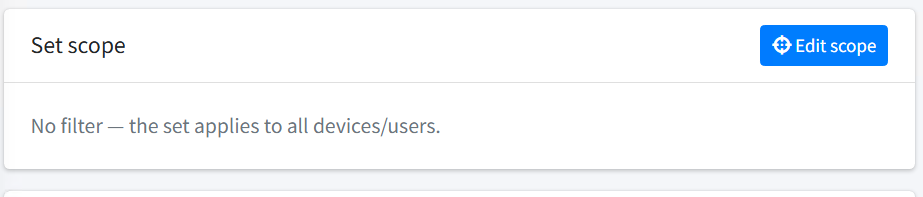
- Use Edit scope to narrow the scope to the target devices, e.g. by computer name
with wildcards (
*and?). The filter is evaluated locally and needs no Active Directory:
- Add policy → template Mount drives:

- Fill in the drive entry like this:
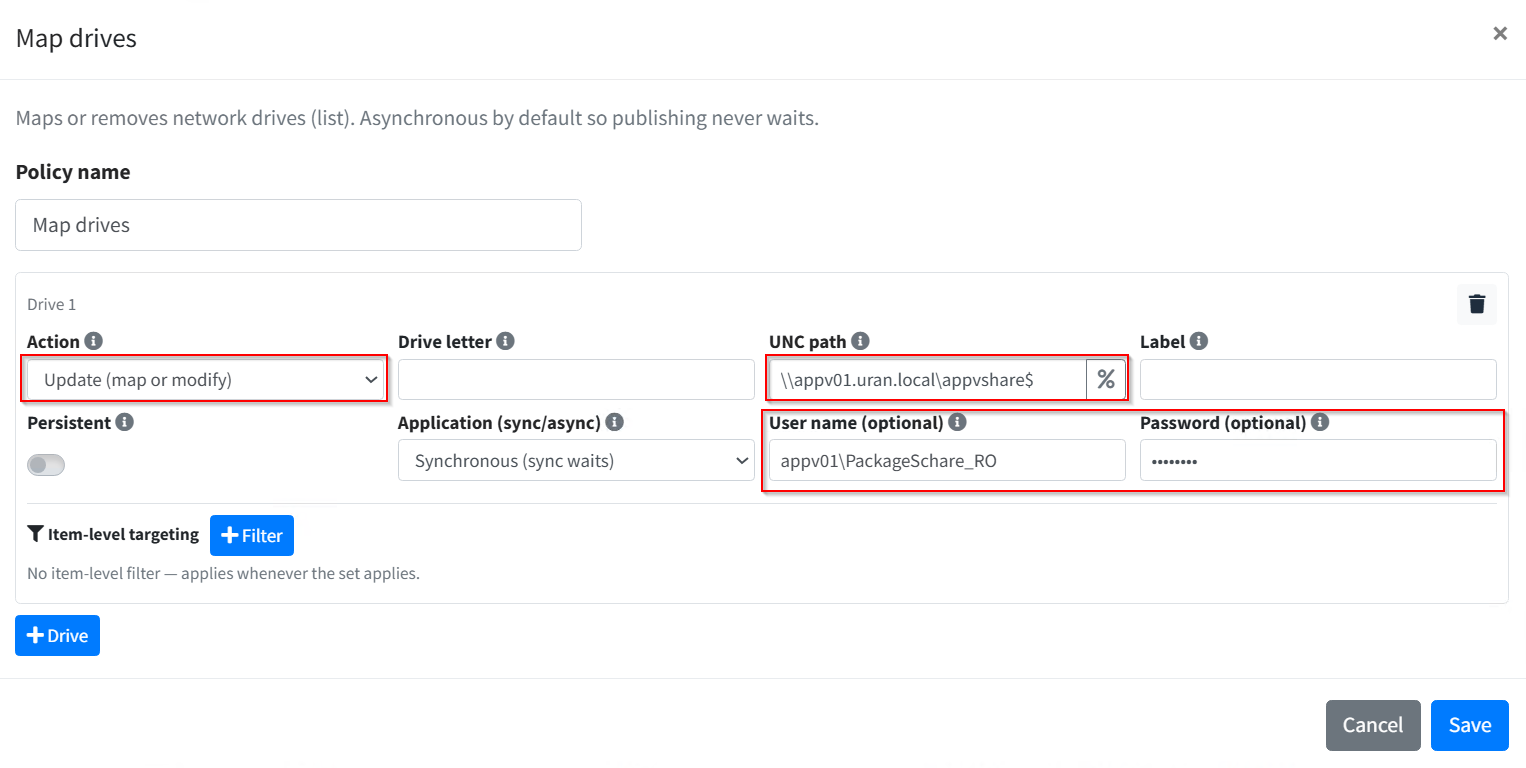
| Field | Value | Note |
|---|---|---|
| Action | Update (connect or change) | Default |
| Drive letter | empty | With no letter, only the SMB session is built. |
| UNC path | \\fileserver\pakete$ |
The same server name as in the portal's package repository. |
| Application (Sync/Async) | Synchronous (Sync waits) | Required: this makes sure the connection stands before packages are deployed (section 4.5). |
| Username (optional) | FILESERVER\PackageShare_RO |
The read-only account |
| Password (optional) | ●●● | Stored encrypted on save |
- Set the record to Active. At the next user sync, the agent log shows:
INF [2614] Policy SMB session established: \\fileserver\pakete$
Security. The password is stored and sent encrypted, but any device that receives
the policy can read it — obfuscation, not secrecy (the same lesson as cpassword in
group policy). So this policy should only ever carry a read-only account, never a
privileged one; with read rights on package files alone, it is not a worthwhile target.
3.5 Entitling and checking packages
- Entitle: on the MSIX package page, in the AD permissions card, use Add to pick the source API clients — it lists the enrolled devices and users — or a portal group that groups these principals together. Import and publishing are described in Distributing MSIX packages.
- Portal: under Known clients, the device shows Key: active, the token used, and a fresh timestamp under Last sync; the local user appears under Known users.
- Agent log (
C:\ProgramData\NickIT\ZeroPortalAgent\Logs):
INF [2614] Policy SMB session established: \\fileserver\pakete$
  INF [2400] AddPackage (current user): file://fileserver/pakete$/MSIX/...
  INF [2519] User sync done — installed=1 ...
- Tray: the card shows progress. Installs that take minutes without internet access
are explained in Known issues.
4. Rules: when does what apply
4.1 Key model
- The machine key sits DPAPI-protected in the machine branch of the registry (readable only with admin rights), the user key in the user branch, protected for exactly that account.
- Only local accounts get a user key. A domain account already has an identity and gets no key — otherwise its AD groups would stop applying.
- The identity
user@devicenameis bound to this account on this device; local accounts of the same name on different devices stay separate principals. - A stored key takes precedence over Kerberos; in the user context, the user key takes precedence over the machine key. If a device later joins the domain, remove the machine key (section 4.3) so it acts as a computer account again.
- The agent enrolls only if no key is stored locally; an existing key is never renewed on its own. If the same device (identified by a stable machine ID that survives a rename) or the same sign-in name enrolls again, it keeps its principal and permissions; the old key is replaced. That is the recovery path after losing a key.
4.2 Token window
- A token only enrolls devices while its window is open and the expiry date has not passed. A closed or expired window blocks new enrollments — keys already issued stay valid even after the token is deleted.
- Reopen for 14 days keeps the token value; installation lines and scripts already out there keep working.
- The Key-based access switch is checked on every request: off means off immediately, for enrollments and for every existing key.
4.3 Disable or delete
Under Known clients, two actions look similar but differ a lot:
| Activate/deactivate key | Delete client and key | |
|---|---|---|
| Effect | The portal rejects the key right away; the device stays listed. | The row, the key, and every assignment (package entitlements, portal-group membership, module rights) are removed. |
| Permissions | kept | lost |
| Way back | Re-enable — the device carries on. | The device does not re-enroll on its own: it keeps sending its old key, the portal rejects it, the sync fails. |
Disabling is the move for "lock out for now"; deleting is for cleaning up devices that are not coming back. Deleting a registered user under Known users also removes their key.
To enroll a deleted device again, remove the key locally — there is no cmdlet for this:
reg delete HKLM\SOFTWARE\NickIT\ZPAgent\Auth /v ApiKey /f
Restart-Service ZeroPortalAgent
The machine sync after the restart enrolls the device again, provided the token is still
stored and its window is open. To remove a user key, delete the value ApiKey under
HKCU\SOFTWARE\NickIT\ZPAgent\Auth in the user's own context and trigger the user sync
(tray icon or Sync-ZPAgentPublishingServer -Method User).
4.4 Limits
- MSIX only, user context only. Package installation for the signed-in user uses their SMB session. App Attach and machine-wide installs run in the service as the system account, which has no credentials for the share without a domain.
- App-V is not possible: App-V entitlement only accepts AD groups, and delivery would also run in the service.
- Policy filters on an AD group or organizational unit never match on a workgroup device; computer name, IP range, operating system, registry value, file/folder, and the other locally evaluated filters work.
4.5 Order in the user sync
The user sync processes policies first, then packages. Drives set to Synchronous (Sync
waits) are connected inside the policy run; asynchronous ones run on a background
track with a 120-second guard that package delivery does not wait for. That is why the
drive carrying the credentials must be synchronous. The agent setting
Policy/AsyncDrivesPrinters = 0 turns the background track off entirely.
4.6 Licensing
Enrolled devices and users count like domain clients within the licensing 90-day window; 30 licences are included. If none are free, the portal refuses the licence booking but keeps delivering. The agent asks again every four hours and shows the user a notice each time. Details in Users, permissions, licences and logs.
5. Operations and troubleshooting
Where to look:
- Portal: Global Configuration → Agent enrollment — token status, Known clients (key active/disabled, last sync), Known users.
- Agent log:
C:\ProgramData\NickIT\ZeroPortalAgent\Logs. Events listed in the appendix. - Portal log:
C:\ProgramData\NickIT\ZPServer\Logs\ZeroPortalLogs.log. Every enrollment writes a lineEnrollment: …; a rejected key is logged asApiKey: rejected request from <IP> — <Reason>. The agent itself is never told the reason.
| Symptom | Cause | Fix |
|---|---|---|
| Device does not appear under Known clients; agent log has no event 2510 | No token on the device (ENROLLTOKEN forgotten) |
Add the token (rerun the MSI with ENROLLTOKEN=, or set the registry value, see appendix) and restart the service |
Device does not appear; portal log shows Enrollment: refused … no enabled token matched |
Token window closed or expired, or the token value was copied wrong | Reopen for 14 days; compare the value with Show token value |
| Device does not appear; the token dialog shows a warning | Key-based access switch is off | Turn the switch on |
| Event 3505/3506 "No publishing server reachable" | Portal unreachable: name resolution, port, or certificate | Check the hosts entry or DNS and the port; set TRUSTCERT=1 or import the certificate into the computer store |
| Event 3504 "Publishing server list is EMPTY" | SERVER= left out at install time |
Run Add-ZPAgentPublishingServer, or rerun the MSI with SERVER= |
Event 3504 "answered with an error", portal log ApiKey: rejected request |
Key disabled, client deleted, or the switch is off | Enable the key; after a deletion, remove the key locally (section 4.3) |
| User does not appear under Known users | A domain account is signed in (gets no key), or the user sync hasn't run yet | Use a local account; trigger the user sync from the tray icon |
| Event 4613, message "error 1219" | Windows already holds an SMB session with different credentials to the same server | net use * /delete, or sign out and back in |
| Event 4613 with a different error | Wrong read-only account, password, or UNC path; share or NTFS permission missing | Test the credentials on the file server; check both permission levels |
| Deployment fails at the source, event 2614 missing | Drive policy is not taking effect: the record is not Active, the scope does not match, or Application is set to Asynchronous | Check the record and the filter; set Synchronous (Sync waits) |
| Deployment fails at the source, event 2614 present | The server name in the policy differs from the package repository, or the read-only account cannot read the package folder | Use the same server name; check NTFS rights on the package folder |
| Deployment takes several minutes (event 3410) | Signature checking is waiting on an internet connection | Known issues |
| "No licence free" notice every four hours | Licence window exhausted | Check licences; packages are still delivered |
6. Appendix: technical reference
Enrollment on the device
| Key | Value | Content |
|---|---|---|
HKLM\SOFTWARE\NickIT\ZPAgent\Auth |
EnrollmentToken |
Rollout token in clear text (from ENROLLTOKEN) |
HKLM\SOFTWARE\NickIT\ZPAgent\Auth |
ApiKey |
Machine key, DPAPI-protected (machine) |
HKCU\SOFTWARE\NickIT\ZPAgent\Auth |
ApiKey |
User key, DPAPI-protected (user) |
HKLM\SOFTWARE\Policies\NickIT\ZPAgent\Auth |
EnrollmentToken |
Token via group policy; takes precedence over the local value |
HKLM\SOFTWARE\NickIT\ZPAgent\Agent |
TrustServerCertificate (DWORD 1) |
Same as TRUSTCERT=1 |
HKLM\SOFTWARE\NickIT\ZPAgent\Servers\1 |
Url, Name |
Publishing server from SERVER= |
Group policy (domain-joined devices only): Computer Configuration → Administrative
Templates → NickIT → ZeroPortal Agent → Authentication → Enrollment token; ADMX
template under C:\Program Files\NickIT\ZeroPortalAgent\admx.
Events in the agent log
| ID | Meaning |
|---|---|
| 2013 | Portal certificate adopted into the computer's root store (TRUSTCERT) |
| 2014 | Certificate check for a server failed |
| 2510 | Enrollment succeeded, key stored (machine or user) |
| 2511 | Enrollment attempt failed (as a warning; the same ID reports package operations as info) |
| 2614 | SMB session established, or drive connected |
| 4613 | Drive policy failed (e.g. error 1219) |
| 2400 | Package install started in the user context |
| 2519 | User sync finished |
| 2530 | Licence notice from the portal (e.g. no licence free) |
| 3410 | Deployment took longer than the threshold |
| 3504 | Machine sync: no server configured, or a server answered with an error |
| 3505, 3506 | Machine sync: no server reachable (retry / offline state) |
| 3514–3516 | Same, for the user sync |