
Policies and templates
Policies control settings on devices and for users centrally from the portal: drives, printers, shortcuts, desktop, scripts, lockdowns for terminal servers and VDI, and not least the rule whether a package is delivered as MSIX or as App Attach. This document explains what policies are, what they are good for, how you create them, and when which policy applies. The technical appendices (custom templates, PowerShell, agent, troubleshooting) are at the end.
1. What is this?
A policy in ZeroPortal is what a group policy is in Active Directory, only without being tied to the AD structure and without Group Policy Management: a group of settings that the ZeroPortal agent applies on the device during a sync and takes back as soon as the device or the user is no longer in scope.
Four terms are enough:
| Term | Meaning |
|---|---|
| Policy set | The container. It bundles policies for a scenario (VDI, terminal servers, notebooks) and carries the priority and scope that apply to all policies it contains. |
| Policy | A group of settings of one type, such as "Map drives" or "Desktop", created from a template. Optionally with additional filters of its own. |
| Template | Determines which fields a policy has and what it does on the device. ZeroPortal ships about twenty templates; the editor is generated from the template. |
| Scope | The filters that decide where (computer) and for whom (user) a set applies: AD group, organizational unit, computer name, IP range, variable, operating system, session type, time window, registry value, file. |
2. What is this good for?
For the digital workplace from a single source. What is otherwise spread over logon scripts, Group Policy Preferences, BGInfo and manual work sits in one policy set next to the packages, with the same scope and the same rollback:
- Setting up the workplace: network drives, printers, shortcuts, environment variables, folders, copying files and adapting them on the way, scripts with a checksum.
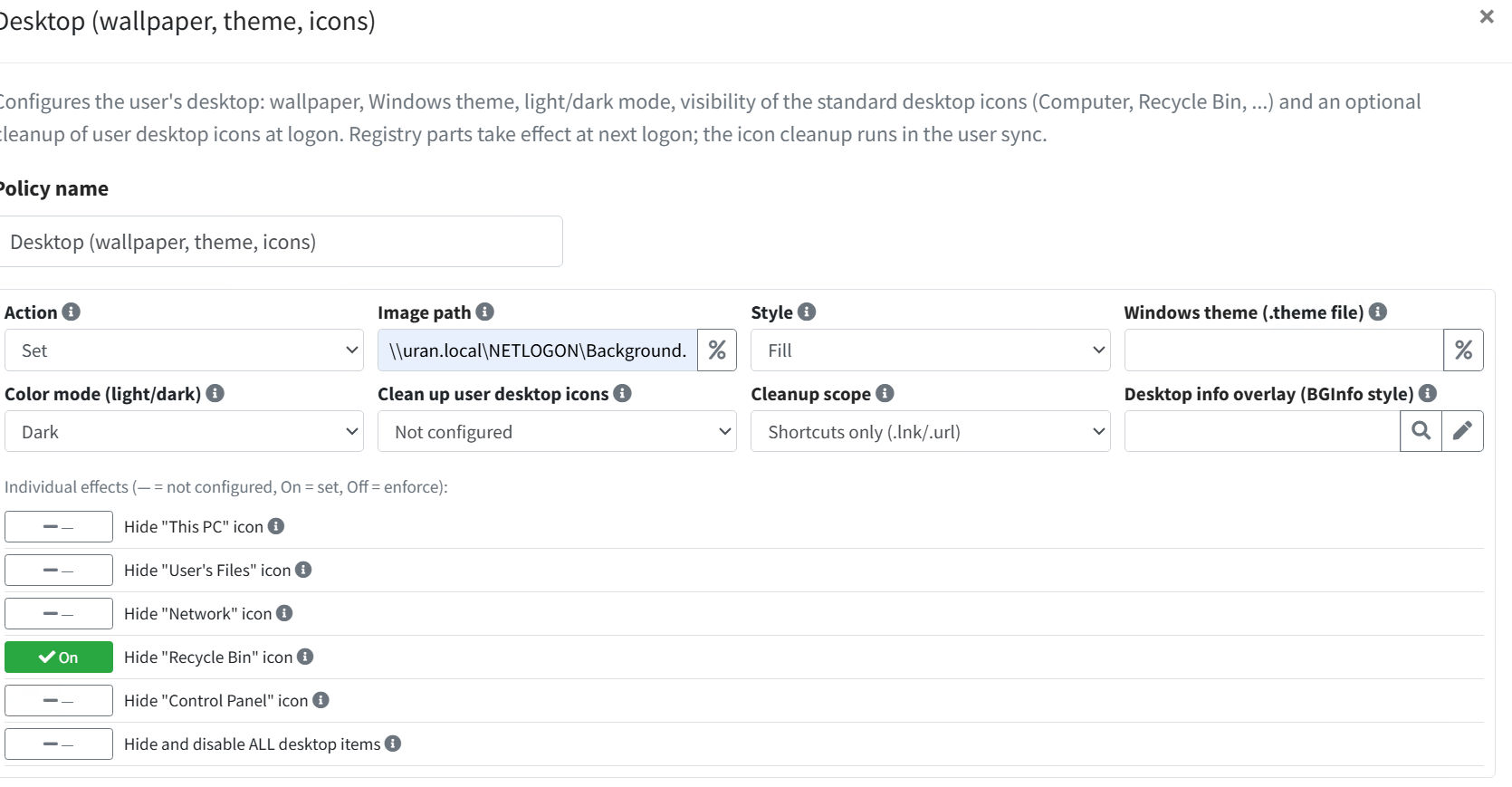
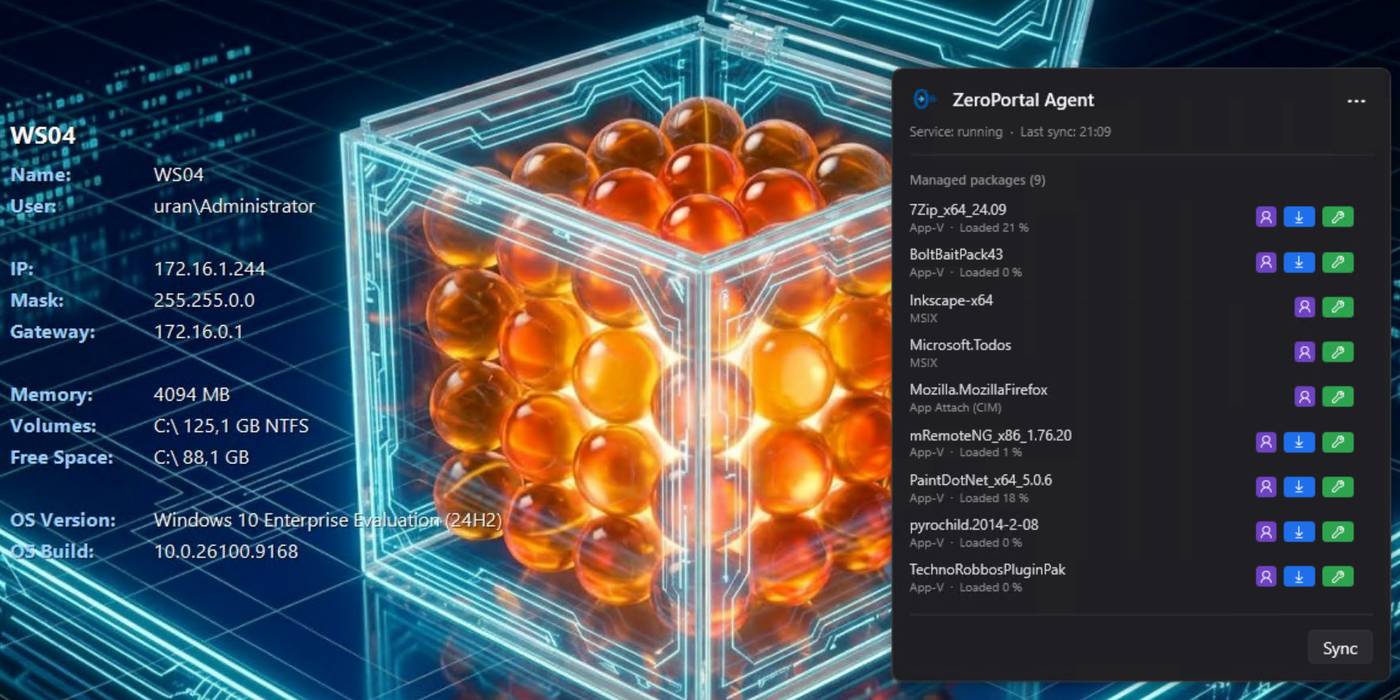
- Look and lockdown: wallpaper and theme, dark mode, icons, a desktop info overlay as a BGInfo replacement, visual effects, drive visibility, restrictions for VDI and terminal servers, Remote Desktop settings, proxy, Store access.
- Controlling delivery: the MSIX delivery format policy decides per package family whether a package is installed as MSIX, mounted as App Attach, or not delivered at all. Package Downgrade Control allows downgrades selectively.
- Controlling the agent: every agent setting can be set as a policy, for example sync intervals or purging the Kerberos tickets before the user sync.
On top of that comes what group policies do not offer: every saved change to a policy is a revision, and an earlier state can be restored (section 3). If a policy is removed or a device leaves the scope, the agent restores the previous state; nothing stays "tattooed". Existing Group Policy Preferences (registry, drives, shortcuts, environment variables, printers, folders) are imported, not retyped.
The templates shipped:
| Template | Effect |
|---|---|
| Registry | Create, change, delete values; optionally permanent |
| Map drives, Drive visibility | Map network drives, hide individual drives in Explorer |
| Connect printers | Connect network printers, set the default printer |
| Shortcuts, Folders, Copy and transform | Create shortcuts and folders, distribute files and adapt them on the way |
| Services, Scheduled tasks, Scripts | Set the start type, create tasks, run scripts |
| Environment variables | Set variables for the computer or the user |
| Desktop, Visual effects, Desktop Restrictions | Wallpaper and theme, performance settings, lockdowns for VDI |
| Remote Desktop Session Host, Remote Desktop - User Settings | Terminal server settings |
| Internet/proxy settings | Proxy and Internet Options |
| Microsoft Store Configuration | Control access to the Store and its updates |
| Agent configuration | Set agent switches centrally |
| MSIX delivery format | Per package family: MSIX, App Attach, or not delivered |
| Package Downgrade Control | Allow or forbid downgrades per package family |
3. How do I use this?
A policy set is created in five steps. The example sets up a "VDI" set for session hosts that delivers Firefox as App Attach and designs the desktop.
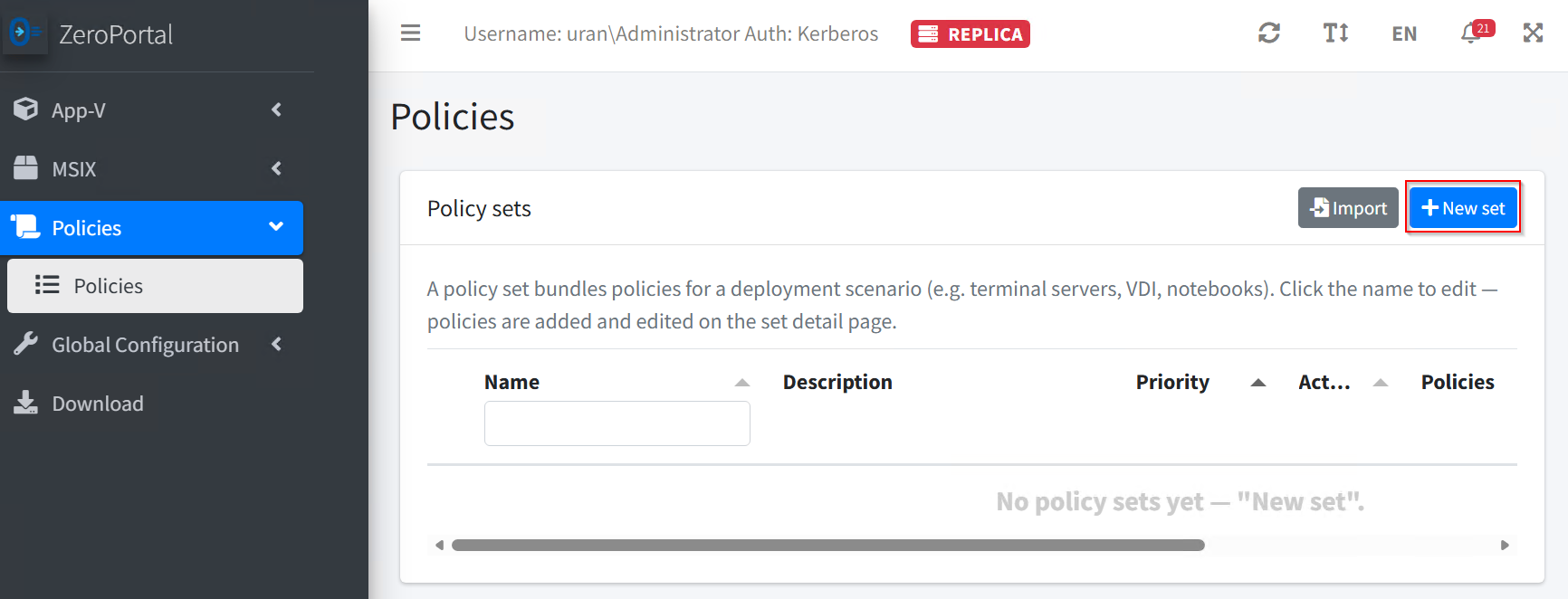
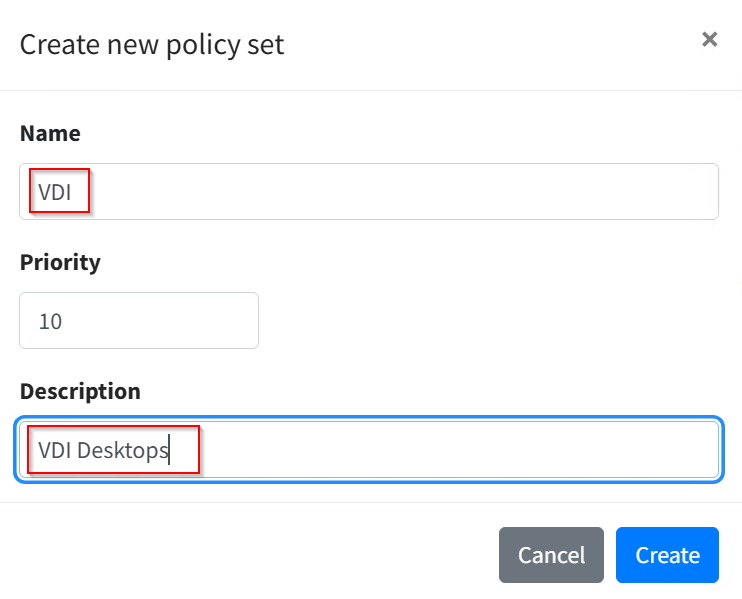
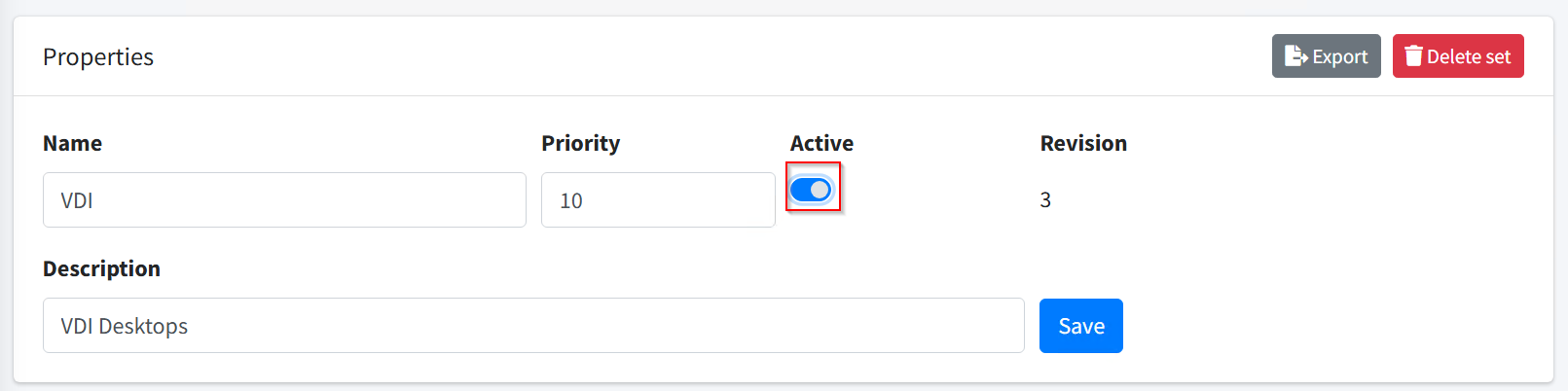
Step 1: Create the set. Policies → Policy sets → New set. Enter a name, description and priority, then Create. The smaller number wins in case of conflicts. New sets start inactive.
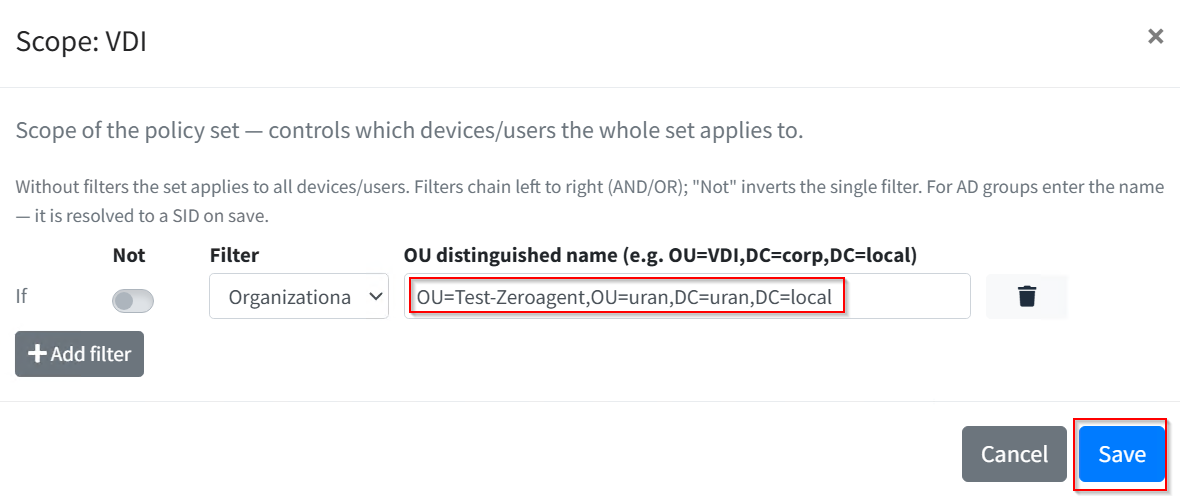
Step 2: Set the scope. On the Set scope card, choose Edit scope and set filters, for
example the organizational unit of the session hosts or a computer name pattern such as
VDI-*. Several filters are combined with AND or OR, and each can be negated.

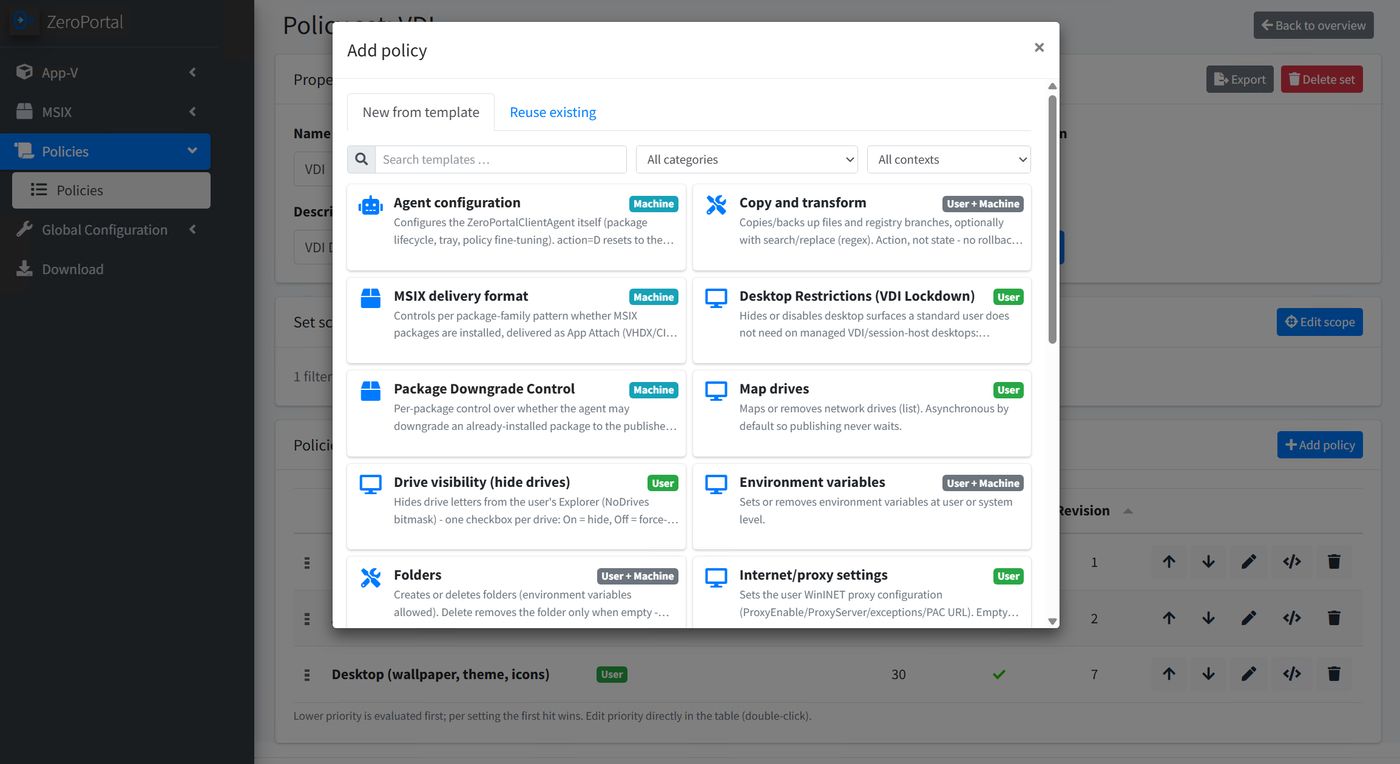
Step 3: Add a policy. Add policy opens the template selection, filterable by category and context (computer, user). The Reuse existing tab adds a policy that already exists to the set, for example the same drive policy for several sets.
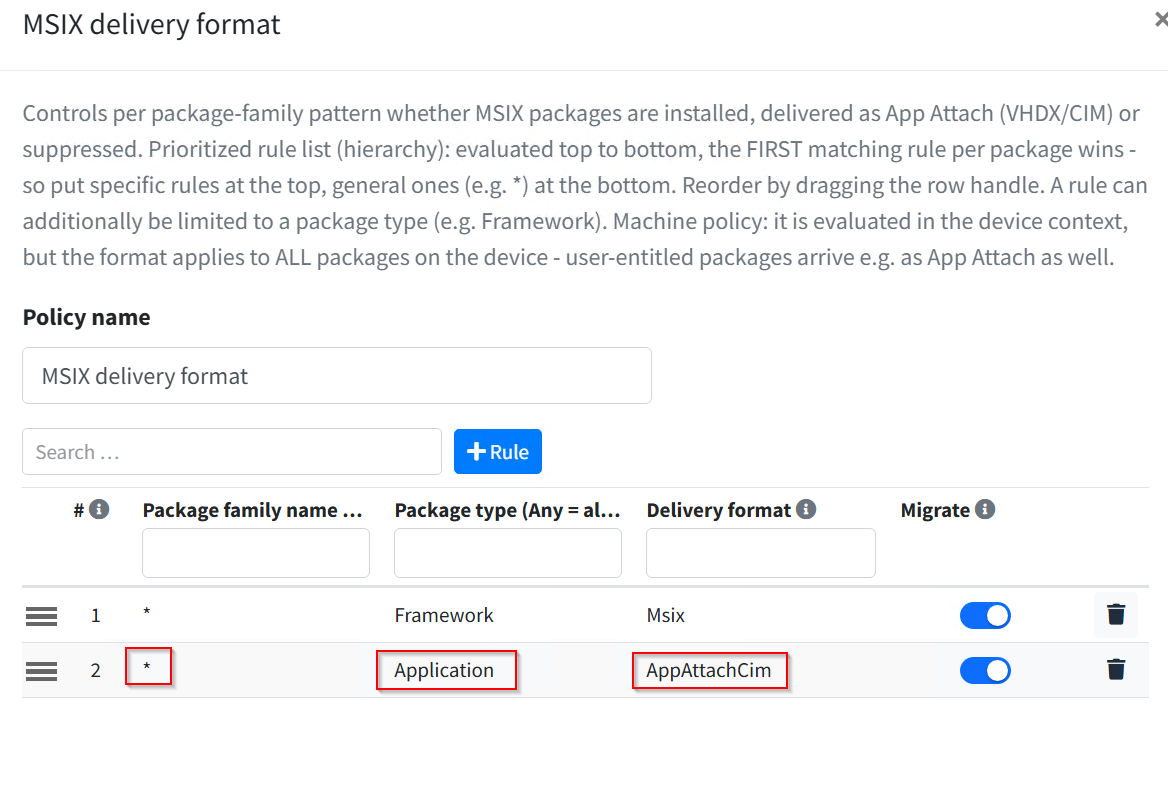
Step 4: Enter values. The editor is generated from the template. List types such as MSIX delivery format or Map drives show a table, with new rows through Add entry; the order matters, the first matching rule wins. Switch types such as Desktop show fields and a checklist with a tick (on), a cross (off) and a dash (not configured). A policy created from a template is active right away; it takes effect only when the set is active too.
Step 5: Activate the set. Save and set the set to Active. At the next sync the agent fetches the policies, applies them before package processing, and reports the result in the tray. Prerequisite: policy processing is turned on on the devices (group policy Enable policy sync, section 7.3); otherwise a freshly installed agent processes no policies.
Three more things that help in daily work:
- Revisions and restore: every saved change to a policy is a revision; the current number
is shown on the policy page. Reading the history and restoring an earlier state is done in
PowerShell:
Get-ZeroPortalPolicyHistory -Name 'VDI Desktop'shows the revisions with date and editor,Restore-ZeroPortalPolicy -Name 'VDI Desktop' -Revision 3restores revision 3. The restore itself becomes a new revision; the agents see a normal change. By default the portal keeps the last 20 revisions (section 7.1). - Expert view: the XML (expert view) icon in the policy list shows a policy's XML; on the policy page it can also be edited under Policy XML (Save (new revision)). Handy for copying between environments, never required.
- Export and import: sets and policies can be saved as building blocks with Export and
brought into another installation with Import, also in PowerShell
(
Export-ZeroPortalPolicyBuildingBlock,Import-ZeroPortalPolicyBuildingBlock). Imported sets start inactive. Import also accepts the XML files of Group Policy Preferences (Registry.xml,Drives.xml,Shortcuts.xml,EnvironmentVariables.xml,Printers.xml,Folders.xml); each file becomes an inactive policy. Item-level targeting of individual entries is not carried over; you set the scope on the set.
4. Scope: when does what apply
A scope describes where (computer) or for whom (user) a set applies. The agent processes policies twice: in the computer sync the computer parts (delivery rules, agent configuration, HKLM, services) and in the user sync the user parts (drives, printers, desktop, HKCU). This matches loopback processing of group policies: a set that targets a computer also brings its user parts to every user who signs in there. That is exactly what VDI and terminal servers need.
Which filter applies in which sync:
| Filter | Computer sync | User sync |
|---|---|---|
| Computer name, IP range, operating system, file/folder | yes | yes |
| Organizational unit | OU of the computer | OU of the user or of the computer |
| AD group | Computer groups (the server resolves them from the computer ticket) | User groups |
| Environment variable | System variables | System and user variables |
| Registry value | HKLM | HKLM and HKCU |
| Session type, time window | not meaningful | yes |
Two rules follow from this:
- A set with computer and user parts targets a computer name, IP range or organizational unit. These three apply in both syncs. A computer group as the only filter carries only the computer parts.
- A set that targets only users (user group, user OU) carries no computer parts.
Further rules in operation:
- Priority: if two settings contradict each other, the first match wins: first by the priority of the set, then by the priority of the policy within the set. The smaller number comes first. All matching sets are processed. If a set's scope does not match, none of its policies apply, not even those with filters of their own.
- Time windows are checked during the sync. A setting whose window has closed is taken back at the next full run, by default every 24 hours, or at the next sync after a change in the portal.
- Repeated sync: mapped drives are not mapped again as long as the letter points to the desired path; only the "Replace" action maps again every time. User registry values (wallpaper, theme) are written right away and take effect at the next sign-in at the latest.
- Rollback: if a device or user leaves the scope or a policy is removed, the agent restores the previous values. Only registry entries explicitly marked "permanent" stay.
- Unknown filters (for example from a newer portal version) make a policy not apply, to be safe; the agent reports this in the log (event 3612).
5. Delivery rules: MSIX or App Attach
The MSIX delivery format policy is the most important policy for MSIX. Without it, every package is installed the classic way as MSIX. With it, you set per package family:
| Format | Effect |
|---|---|
| Msix | Classic installation from the repository |
| AppAttachVhdx, AppAttachCim | Mount the image from the share instead of copying, for terminal servers and AVD |
| Deny | The package is not delivered to these devices, even if it is assigned |
Each rule consists of a pattern on the family name (* allowed), optionally a package type,
and the format. The list is evaluated from top to bottom and the first matching rule wins;
specific rules at the top, the * rule at the bottom. It is a computer policy: the format
applies to all packages on the device. A new policy already contains the rule * / Framework
→ Msix, because frameworks always come as MSIX.
Typical terminal server set: Contoso.Legacy_* → Deny, * / Framework → Msix,
* → AppAttachCim. Workstations without a rule of their own keep getting classic MSIX.
6. For integrators: custom templates
If a template is missing, reach for Registry first. Custom templates pay off for settings with their own editor and help texts that are needed more than once:
- Template
<Name>.zppxunderC:\Program Files\ZeroPortal\PolicyDefinitions, following the ADMX principle (fields and their mapping to registry values), language fileen-US\<Name>.zppl, further languages (de-DE\<Name>.zppl) optional. In a cluster, copy them to every node. - The portal reads the files every time the template selection opens, no restart. Faulty templates are skipped (warning in the portal log); with a faulty language file, raw text IDs appear. After changing the registry mapping of a template in use, save a policy again.
- The agent only sees finished registry values including rollback; no code on the device.
Minimal example for a proxy server (
CorpProxy.zppxanden-US\CorpProxy.zppl):
<ZpPolicyDefinition provider="CorpProxy" version="1.0" category="Workspace" context="User"
    settingsElement="CorpProxySettings" entryElement="CorpProxy" displayName="$(string.DisplayName)" description="$(string.Description)">
  <Attributes>
    <Attribute name="server" type="string" required="1" displayName="$(string.server)" description="$(string.server.desc)"/>
  </Attributes>
  <RegistryMappings>
    <Setting id="ProxyServer">
      <RegistryValue hive="HKEY_CURRENT_USER" key="Software\Microsoft\Windows\CurrentVersion\Internet Settings" name="ProxyServer" type="REG_SZ" valueFrom="server"/>
    </Setting>
  </RegistryMappings>
</ZpPolicyDefinition>
<ZpPolicyLanguage provider="CorpProxy" culture="en-US">
  <String id="DisplayName">Corporate proxy</String>
  <String id="Description">Sets the WinINET proxy server for the user.</String>
  <String id="server">Proxy server</String>
  <String id="server.desc">host:port, e.g. proxy.corp.local:8080.</String>
</ZpPolicyLanguage>
More (type="enum" with min/max, type="tristate" with onValue/offValue, mask bits, when,
DefaultEntries, entryTargeting="1") is shown in InternetSettings.zppx, RdsHost.zppx, Delivery.zppx.
Take registry paths from the ADMX files under C:\Windows\PolicyDefinitions (watch out for inverted
logic such as fDenyTSConnections); test values including the previous state: HKLM\Software\NickIT\ZPAgent\AppliedPolicies\Registry (user: HKCU).
7. Appendix: PowerShell, agent and troubleshooting
7.1 PowerShell
The ZeroPortal module is installed with the portal; the cmdlets do the same as the portal
interface.
Import-Module ZeroPortal
Set-AppvZeroPortalCmdLetConfiguration -BaseUrl 'https://zeroportal:8080' -SkipCertificateCheck $true

New-ZeroPortalPolicySet -Name 'Terminal servers' -Priority 10
New-ZeroPortalPolicy -Name 'AppAttach for AVD' -XmlPath .\appattach.xml -Enabled
Add-ZeroPortalPolicySetMember -SetName 'Terminal servers' -PolicyName 'AppAttach for AVD' -Priority 1
Set-ZeroPortalPolicySet -Name 'Terminal servers' -Enabled $true

Get-ZeroPortalPolicyHistory -Name 'AppAttach for AVD'
Restore-ZeroPortalPolicy -Name 'AppAttach for AVD' -Revision 3
| Cmdlet | Purpose |
|---|---|
Get-ZeroPortalPolicySet [-Name] |
List sets with priority, state and members |
New-ZeroPortalPolicySet -Name [-Priority] [-Description] |
Create a set; it stays inactive until activated |
Set-ZeroPortalPolicySet -Name [-Enabled] [-Priority] [-NewName] |
Activate, rename, change the priority of a set |
Remove-ZeroPortalPolicySet -Name [-Force] |
Delete a set; the policies are kept |
Get-ZeroPortalPolicy [-Name] [-IncludeXml] |
List policies, optionally with XML |
New-ZeroPortalPolicy -Name -XmlPath|-XmlContent [-Enabled] |
Create a policy from XML; inactive without -Enabled |
Set-ZeroPortalPolicy -Name [-XmlPath] [-Enabled] [-NewName] |
Change a policy; every change raises the revision |
Remove-ZeroPortalPolicy -Name [-Force] |
Delete a policy including memberships and history |
Add-ZeroPortalPolicySetMember -SetName -PolicyName [-Priority] |
Add a policy to a set |
Set-ZeroPortalPolicySetMember -SetName -PolicyName [-Priority] [-Enabled] |
Change priority or state of a membership |
Remove-ZeroPortalPolicySetMember -SetName -PolicyName [-Force] |
Take a policy out of a set |
Get-ZeroPortalPolicyHistory -Name [-IncludeXml] |
Show revisions with date and editor |
Restore-ZeroPortalPolicy -Name -Revision |
Restore an earlier revision as a new revision |
Export-ZeroPortalPolicyBuildingBlock -SetGuid|-PolicyGuid |
Output a set or policy as building-block XML |
Import-ZeroPortalPolicyBuildingBlock -Path |
Import building-block XML or GPP XML; sets start inactive |
The GUID for the export comes from (Get-ZeroPortalPolicySet -Name 'VDI').SetGuid or
(Get-ZeroPortalPolicy -Name 'VDI Desktop').PolicyGuid.
Full administrators set two portal-wide values with Set-ZeroPortalConfigurationValue
-Name <Name> -Value <Value>: PolicyHistoryDepth (default 20, revisions kept per policy) and
PolicyAssetMaxKB (default 256, size limit per uploaded file such as a script, icon or
overlay; also in Global Configuration).
7.2 Delegating policy management
Full administrators grant each portal group the level Read or Administrate in the
Policies area under Global Configuration → Permissions (see Users, permissions, licences
and logs); in PowerShell Add-ZeroPortalRoleAssignment -RoleName PolicyAdmin
-GroupName 'ZP-PolicyAdmins' (read only: PolicyReader). The permission takes effect from
the next sign-in to the portal.
7.3 Processing on the device
The agent processes policies in the computer and in the user sync, each time before the packages; an error in policy processing never aborts the sync, and the delivery rules last in effect stay valid. Without a server connection, the cached state applies. Every run ends with event 2600, a notice in the tray, and a report to the portal.
Set the switches by group policy (ADMX, takes precedence), locally with
Set-ZPAgentConfiguration -<switch> <value>, or centrally through the Agent configuration
policy as Policy/<switch>; Get-ZPAgentConfiguration -Policy shows all effective values. The
four that matter:
| Switch | Default | Consequence |
|---|---|---|
PolicyProcessingEnabled |
off | Main switch (ADMX Enable policy sync, Enable-ZPAgentSync -Policy, or POLICYSYNC=1 at installation). Off: no policies are fetched or applied, policies already applied stay; event 2522 |
FastSkip |
on | The run ends if nothing changed on the server; exception: a drive or printer connection failed last time |
FullReapplyHours |
24 | A full run after this many hours at the latest: repairs drift, takes back expired time windows |
RefreshMinutes |
90 | Cycle of the policy refresh between syncs (5 to 1440; ADMX Policy refresh interval), like the background refresh of group policies |
7.4 Storage on the device
| What | Where |
|---|---|
| Policy cache (works offline) | C:\ProgramData\NickIT\ZeroPortalAgent\Policies\Machine and …\Policies\Users\<SID> |
| Uploaded files (scripts, icons, overlays), stored by checksum | C:\ProgramData\NickIT\ZeroPortalAgent\Assets |
| Applied settings including the previous state for rollback | HKLM\Software\NickIT\ZPAgent\AppliedPolicies\<area> (computer) and HKCU\…\AppliedPolicies\<area> (user); areas: Registry, Drives, Printers, Shortcuts, Folders, ScheduledTasks, Scripts, CopyTransform, AgentConfig |
| Effective delivery and downgrade rules | HKLM\Software\NickIT\ZPAgent\Policy\Effective\Delivery and …\Effective\Downgrade |
Time of the last full run (LastApplyUtc) |
HKLM\Software\NickIT\ZPAgent\Policy (computer), HKCU\…\ZPAgent\Policy (user) |
| Agent log service / user | C:\ProgramData\NickIT\ZeroPortalAgent\Logs\agent-<date>.log and usersync-<user>-<date>.log |
| Portal log | C:\ProgramData\NickIT\ZPServer\Logs\ZeroPortalLogs.log |
7.5 Events in the agent log
| ID | Meaning |
|---|---|
| 2522 | Policy processing switched off by configuration (main switch off) |
| 2600 | Summary of a policy run: set, taken back, failed, number of delivery rules |
| 2610–2612 | Registry value deleted / set / taken back |
| 2613 | Service action carried out (start, stop, restart) |
| 2614, 2615 | Drive mapped / disconnected |
| 2616, 2617 | Shortcut created / removed |
| 2618, 2619 | Printer connected / removed |
| 2620–2622 | Agent switch reset / set / restored after the policy went away; 2622 also: copy task done |
| 2623, 2624 | Folder created / deleted or taken back |
| 2625, 2626 | Scheduled task created / removed |
| 2627 | Script finished successfully |
| 2628 | Desktop cleaned up |
| 2630 | Package suppressed by a delivery rule (Deny) |
| 2105, 2106 | Policy refresh scheduled / finished |
| 3600 | Policies not retrievable; next server or cache is used |
| 3610 | AD group filter without SID; policy does not apply |
| 3611 | Invalid IP range or invalid time window; policy does not apply |
| 3612 | Unknown filter type; policy does not apply |
| 3613, 3614 | OU filter without path / device without a domain DN (workgroup); policy does not apply |
| 3615, 3616 | Disconnecting a drive / cleaning up a shortcut failed |
| 3617 | Shortcut icon not obtainable from any server |
| 3618 | Default printer could not be set |
| 3622, 3623 | Script skipped (file or checksum missing) / script ended with an error code, repeated at the next run |
| 3624 | Desktop info overlay failed |
| 4600 | Policy package from the server or the cache not readable |
| 4601, 4602 | Policy processing aborted in the computer / user sync; the package sync carries on |
| 4610, 4611 | Setting / taking back a registry value failed |
| 4612–4617 | Service action, drive, shortcut, printer, copy task, folder failed |
| 4618 | Scheduled task or desktop cleanup failed |
| 4619 | Script blocked (checksum does not match) or failed |
| 4620 | Agent switch could not be set or taken back |
7.6 For evaluations: two queries
Only through the portal API (in the browser with Windows sign-in, or with
Invoke-RestMethod -UseDefaultCredentials):
| Query | Purpose |
|---|---|
GET /api/Policy/Rsop?computerName=VDI-01&ou=<DN>&sids=<SID,SID>&ip=<address> |
Preview: which sets and policies match the given characteristics. Filters only the device can decide (time, registry, file, session, operating system) are reported as "device" |
GET /api/Policy/Reports?identity=<name> |
Last application report per device or user: applied sets and policies, counters, agent version, time |