
Known Issues
Each section describes one issue the way an administrator sees it, names the cause, and the fix. The issues are unrelated to each other; read only the section whose symptom you are seeing.
1. The browser asks for a password, or access is denied despite having permission
Usually there is nothing to do here. Kerberos signs domain users in automatically through the server's computer account; the SPN for the server's own name already exists. Something needs setting up only if the portal must also be reachable under a different name, for example behind a Network Load Balancer (NLB) with one shared address for several nodes. We advise against that: ZeroPortal needs no load balancer for high availability, the agent switches to the next reachable node on its own (see Setting up high availability). An SPN on a shared alias is exactly the source of error this section describes — for the same reason, many vendors avoid NLB in front of Kerberos-secured services.
1.1 Symptom
- A login window appears when opening the portal; after entering domain credentials, everything works. Cancelling shows the "Sign in required" page instead.
- Or: the header shows the account, but the portal says "no access", even though the user is in the right AD group.
1.2 Cause
The portal signs domain users in silently through Windows authentication (Negotiate: Kerberos or NTLM). Browsers only send the Windows account to sites in the Local Intranet zone; if that zone entry is missing, the login window appears (401). "No access" (403), on the other hand, is a permissions question: the group is not assigned to a portal group, or the ticket predates the group change. NTLM instead of Kerberos happens with an alias name that has no SPN, or when accessing by IP address; the permissions in the portal are the same either way.
1.3 Fix
- Add the portal URL to the intranet zone, by group policy for every user:
User Configuration → Administrative Templates → Windows Components → Internet
Explorer → Internet Control Panel → Security Page → Site to Zone Assignment List,
portal URL (e.g.
https://zeroportal.firma.localor*.firma.local) with value 1; the same setting also exists under Computer Configuration. To test on a single machine: Internet Options → Security → Local Intranet → Sites → Advanced.
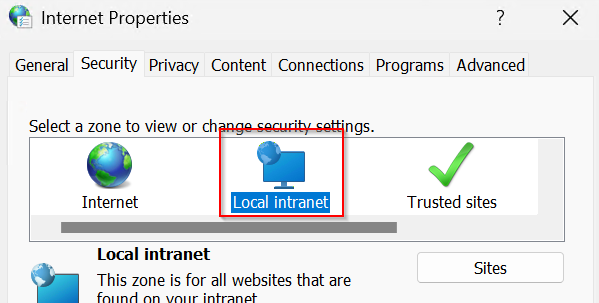
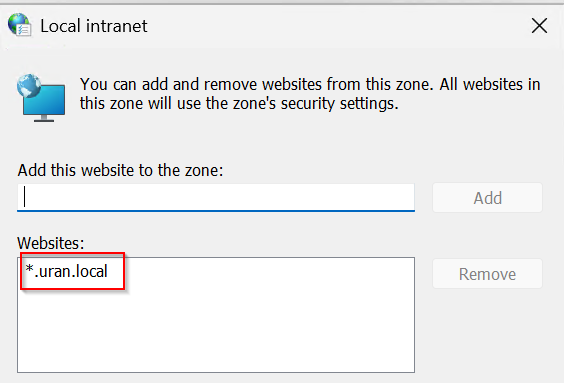
-
For Edge and Chrome, alternatively: the browser policy
AuthServerAllowlistwith the portal name (several separated by commas). Firefox:network.negotiate-auth.trusted-uris. -
SPN only for an alias. The SPN already exists for the server's own name. If the portal is reached under a DNS alias (e.g.
zeroportal.firma.localpointing atZPSRV01), register it on the server's computer account:
powershell
   setspn -Q HTTP/zeroportal.firma.local        # is the name already taken?
   setspn -S HTTP/zeroportal.firma.local ZPSRV01$
   setspn -L ZPSRV01$                            # check
An SPN may only sit on one account; no portal restart is needed; there is no SPN for an IP address. Load balancer in front of several nodes: NTLM, or a shared gMSA.
-
On "no access": check permissions in the portal (see Users, permissions, licences and logs); sign out and back in on the Windows client after a group change.
-
Browser on the portal server itself, admin group is Domain Admins: the module pages appear, but Permissions, Portal groups, Internal accounts, Agent enrollment, Licensing and Audit trail are missing from the menu, and the AD search in the entitlement dialog reports "Search failed (403)". The header shows NTLM. Cause: with User Account Control on, a browser on the server signs in through the NTLM loopback with the filtered session token, in which privileged groups such as Domain Admins are "deny only" (
whoami /groups). Neither the intranet zone nor an SPN changes that. Fix: bind portal administrators to a regular AD group (e.g. ZeroPortal Admins; its membership stays active in a filtered token), administer from another machine, or start Edge elevated for this session. "Run as administrator" alone is not enough for Edge, because Edge drops the elevation again by itself:
powershell
   Start-Process msedge.exe -ArgumentList '--do-not-de-elevate', 'https://zeroportal.firma.local:8080'
From server 1.0.33 the portal shows a banner with exactly this command in that situation.
1.4 Check
Open the portal from a client: no login window should appear, and the header shows
account and method (Username: DOMAIN\user Auth: Kerberos).

On the client, klist shows the ticket HTTP/zeroportal.firma.local, whoami /groups
the groups in the token. In the portal log
C:\ProgramData\NickIT\ZPServer\Logs\ZeroPortalLogs.log, every rejected action is
logged as a warning Access denied (403): user '…' tried …; a login window (401) is not
logged. A browser on the portal server itself usually shows NTLM; that is not an error.
| Symptom | Cause | Fix |
|---|---|---|
| Login window, everything works after entering credentials | Portal URL not in the Local Intranet zone | Roll out the zone entry by GPO (step 1), restart the browser |
| Login window, credentials are not accepted | NTLM blocked and Kerberos not possible (alias without SPN, access by IP) | Access by the server name, or register an SPN (step 3) |
| "No access" despite the right AD group, header shows the account | Group not assigned to a portal group, or ticket predates the group change | Check permissions, sign out and back in on the client, check the log for Access denied (403) |
| Only in a browser on the server itself the identity pages are missing, the AD search reports 403, the header shows NTLM | With User Account Control on, privileged groups such as Domain Admins count only as "deny only" in a non-elevated browser | Bind portal administrators to a regular AD group, administer from another machine, or start Edge elevated with --do-not-de-elevate (step 5); intranet zone and SPN do not help |
| Header shows NTLM although Kerberos is expected | Alias without SPN, access by IP, a duplicate SPN, or the client's clock is more than five minutes off | Check setspn -Q HTTP/<name> and setspn -X (duplicates), check time sync, access by the server name |
2. Installing an MSIX package takes minutes on devices without internet
Some devices have no internet access for good reason: manufacturing networks, point-of-sale systems, classified or otherwise isolated networks, or a proxy that only lets signed-in users through and shuts out the system account. But Windows checks a package's signature online by default — without a connection, every check runs into a timeout before the install continues. This section shortens the wait without turning the check off.
2.1 Symptom
- MSIX and App Attach packages take one to several minutes per package on devices without internet, or behind a proxy, while others take only seconds; the package itself has long since finished transferring. The Windows App Installer shows the same thing on a double-click.
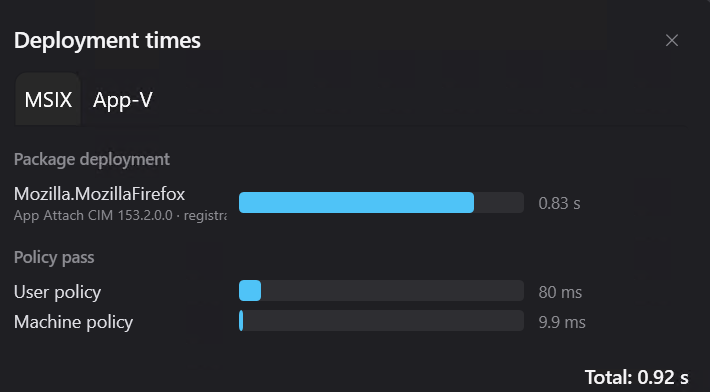
- In the agent's tray menu, Deployment times shows a long package deployment.
- The agent log carries warning 3410 as soon as a deployment has taken longer than
30 seconds (threshold
Agent/SlowDeployWarnSeconds, default 30, 0 = off). It names the missing intermediate certificate or the unreachable revocation-list addresses.
2.2 Cause
Before installing, Windows checks the signature of every package and, to do so, wants to
fetch the intermediate certificate from the internet (if it is missing locally) and
check the revocation list (CRL) or an OCSP response. Without internet, every
lookup runs into a timeout: 15 seconds per address by default, and up to 20 seconds per
check; a package is checked more than once, so this adds up to minutes. Deployment runs
under the system account; a proxy set up only for signed-in users does not help it
(netsh winhttp show proxy).
2.3 Fix
Every step needs administrator rights; none of them turns off signature checking. Steps 1 and 2 are safe on any device, step 3 only for devices without internet.
- Add the intermediate certificate to the computer store. On a machine with
internet: right-click the package → Properties → Digital Signatures → Details →
View Certificate → Certification Path, select the certificate between issuer and
root, View Certificate → Details → Copy to File (DER,
.cer). On the device, import it into the local computer's Intermediate Certification Authorities store:
powershell
   Import-Certificate -FilePath .\Intermediate-CA.cer -CertStoreLocation Cert:\LocalMachine\CA
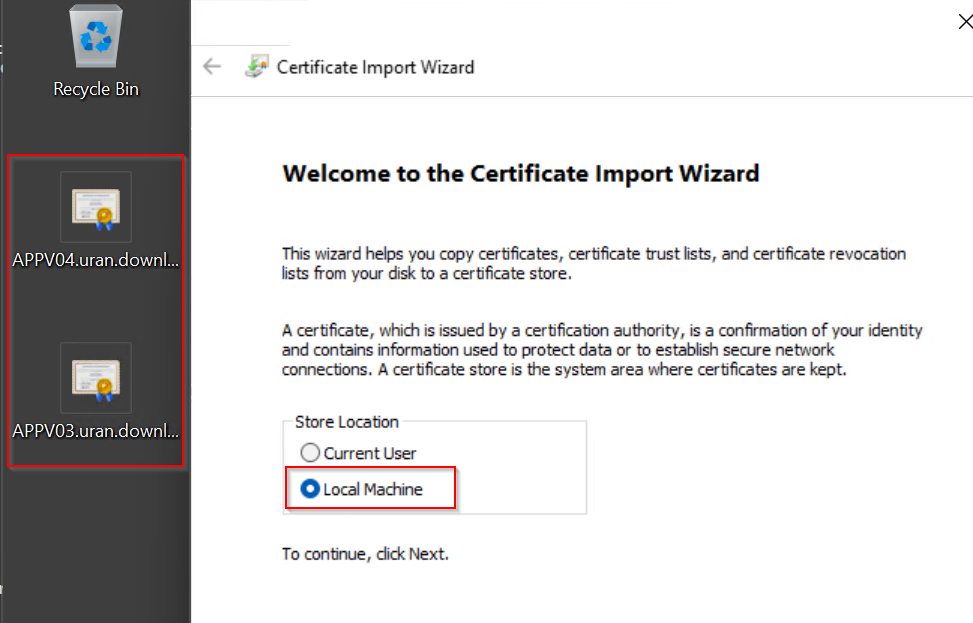
Centrally: Computer Configuration → Policies → Windows Settings → Security Settings → Public Key Policies → Intermediate Certification Authorities. Trust is still decided by the root authority.
- Limit the wait for certificate lookups. Revocation checking stays on, but without internet it now fails after seconds instead of a quarter minute per address:
powershell
   $key = 'HKLM:\SOFTWARE\Microsoft\Cryptography\OID\EncodingType 0\CertDllCreateCertificateChainEngine\Config'
   New-Item -Path $key -Force | Out-Null
   New-ItemProperty -Path $key -Name ChainUrlRetrievalTimeoutMilliseconds -Value 3000 -PropertyType DWord -Force | Out-Null
   New-ItemProperty -Path $key -Name ChainRevAccumulativeUrlRetrievalTimeoutMilliseconds -Value 6000 -PropertyType DWord -Force | Out-Null
Centrally: the same values as a registry item (Computer Configuration → Preferences → Windows Settings → Registry) or the policy Public Key Policies → Certificate Path Validation Settings, Network Retrieval tab, both timeouts in seconds.
Consequence: signature checking itself is not turned off, it just gives up sooner when an address does not answer. On devices with an occasionally slow or unstable network, this can make the revocation check end more often in "could not be determined" instead of "valid" — Windows still allows the install in that case, but the revocation list was not checked in full. Do not set these values on devices with reliable internet.
- Turn off the Defender cloud query (devices without internet only). Real-time protection stays on:
powershell
   Set-MpPreference -MAPSReporting Disabled -SubmitSamplesConsent NeverSend -DisableBlockAtFirstSeen $true
Centrally: Computer Configuration → Administrative Templates → Windows Components → Microsoft Defender Antivirus → MAPS. Leave out on devices with occasional internet.
- Restart the deployment service. The certificate takes effect right away, but the timeout values only reliably apply after restarting the AppXSvc service or the device:
powershell
   Restart-Service AppXSvc -Force
The restart aborts any deployment in progress; do not run it during a sync. When rolled out by group policy, the device's next restart is enough.
- Make the revocation-list addresses reachable (recommended). If devices can reach
the CRL and OCSP addresses (a proxy or firewall exception, an internal mirror), the
check is fast and complete. The addresses appear in warning 3410 and in the output of
certutil -verify -urlfetch(section 2.4).
Only as a last resort: the options Check for server certificate revocation and Check for publisher's certificate revocation (Internet Options, Advanced) apply only to the user account, are not reliable for the system account, and a revoked certificate is no longer detected. To undo: delete the registry values.
2.4 Check
Measure before and after (clear the cache first, so the measurement is honest):
certutil -urlcache * delete
Measure-Command { Get-AuthenticodeSignature 'C:\Path\App.msix' }
Under a second: fine. Two-digit seconds or more: the device is affected.
Check the chain and each address (shows, per address, whether the lookup succeeded):
$sig = Get-AuthenticodeSignature 'C:\Path\App.msix'
[IO.File]::WriteAllBytes("$env:TEMP\signer.cer", $sig.SignerCertificate.Export('Cert'))
certutil -verify -urlfetch "$env:TEMP\signer.cer"
Agent log: C:\ProgramData\NickIT\ZeroPortalAgent\Logs\agent-<date>.log, the line
with [3410]. "Certificate chain INCOMPLETE … '
| Symptom | Cause | Fix |
|---|---|---|
| Still slow after step 1 | The wait comes from the revocation-list lookups | Step 2 (timeouts) and step 5 (open up the addresses) |
| No change after step 2 | Service not restarted, values under the wrong key, or another intermediate certificate is missing | Restart AppXSvc, compare the key path with the appendix, check log 3410 for the named issuer |
| No warning 3410, yet it's slow | Deployment under the threshold, package fetched over HTTP, or diagnosis not possible | Measure by hand (above); lower the threshold with Set-ZPAgentConfiguration -SlowDeployWarnSeconds |
| Fast on the admin PC, slow on the devices | The admin PC has internet or a proxy the devices' system account does not have | Check netsh winhttp show proxy on a device; apply steps 1 to 5 there |
| Error 0x800B0109 instead of a wait | Signature certificate not trusted on the device | Distribute the root certificate, see Distributing MSIX packages |
Appendix: registry (local computer)
| Key | Value | Type | Recommendation | Windows default | Meaning |
|---|---|---|---|---|---|
HKLM\SOFTWARE\Microsoft\Cryptography\OID\EncodingType 0\CertDllCreateCertificateChainEngine\Config |
ChainUrlRetrievalTimeoutMilliseconds |
DWORD | 3000 | 15000 | Timeout per lookup address |
| same key | ChainRevAccumulativeUrlRetrievalTimeoutMilliseconds |
DWORD | 6000 | 20000 | Total wait for all revocation-list lookups in one check |
Registry (per user account, not recommended)
| Key | Value | Meaning |
|---|---|---|
HKCU\Software\Microsoft\Windows\CurrentVersion\WinTrust\Trust Providers\Software Publishing |
State = 0x23C00 |
Default: publisher revocation check on |
| same key | State = 0x23E00 |
Check for publisher's certificate revocation unchecked |