
Client agent: operations, rollout and group policies
For administrators. As of September 2026 (Server 1.0.31, Agent 1.0.36). Related guides: Administration Handbook (chapter "Connecting clients"), Quick Admin Guide (step by step with screenshots), Devices without a domain (API key), Known issues, Distributing MSIX packages, Policies and templates.
1. What is this?
The ZeroPortal client agent runs on the end device. It asks the portal what is assigned to the computer and to the signed-in user, and puts that into effect locally: MSIX packages (also as App Attach), App-V packages and connection groups, and ZeroPortal policies. It tells the portal that the device and user are active (licence receipt), and shows the user through a tray icon what is happening right now.
| Part | Runs as | Job |
|---|---|---|
Service ZeroPortalAgent |
Local System account | Machine sync: machine-wide packages, mounting App Attach images, App-V for the computer, computer policies. Starts the tray icon in every session. |
Scheduled task \NickIT\ZeroPortalAgent\UserSync |
Signed-in user | User sync at sign-in, unlock, and on an interval: user packages and user policies. |
| Tray icon | Signed-in user | Status, managed packages, manual sync, repair, logs, deployment times. |
| Path | |
|---|---|
| Installation | C:\Program Files\NickIT\ZeroPortalAgent |
| Group policy template (ADMX, de-DE and en-US) | C:\Program Files\NickIT\ZeroPortalAgent\admx |
PowerShell module ZeroPortalAgent |
installed with the agent, cmdlets *-ZPAgent* |
| Logs | C:\ProgramData\NickIT\ZeroPortalAgent\Logs |
| App Attach mount point (default) | C:\ProgramData\NickIT\AppAttach |
| Settings | HKLM\SOFTWARE\NickIT\ZPAgent (local), HKLM\SOFTWARE\Policies\NickIT\ZPAgent (group policy) |
Signing in to the portal. On a domain, the agent needs no configuration: the service
signs in with the computer account (Kerberos), the user sync with the user's ticket.
Devices without a domain fetch a key of their own through an enrollment token (stored
protected under HKLM\SOFTWARE\NickIT\ZPAgent\Auth); if a key exists, it is used,
otherwise Kerberos. See Devices without a domain (API key).
2. What is this good for?
- Workstations on the domain. MSI through group policy or software deployment, every setting from one GPO. After the first sign-in the assigned applications appear; new assignments arrive with the next sync.
- Terminal servers and session hosts. The machine sync deploys packages machine-wide, the user sync registers them at every sign-in. App Attach keeps package content on one central image instead of in every profile.
- Notebooks. Without contact to the portal, the agent keeps working from its cache and removes nothing. Locally installed MSIX and fully loaded App-V packages run offline; App Attach needs the share.
- Several sites. A site-local path for the package source (
MSIX/MSIXPackageRoot) keeps package traffic inside the site network. - Clusters. Several portal servers in the server list form a priority chain; on a failure, the agent switches to the next one.
- Devices without Active Directory. Pilot devices or standalone machines sign in with a key they fetch themselves using an enrollment token.
3. How do I use this?
3.1 Getting the agent MSI
The agent MSI matching the server is in the portal's sidebar under Download (full administrators, and groups with level Read for the Download area on the Permissions page). New agent versions arrive with the server update.
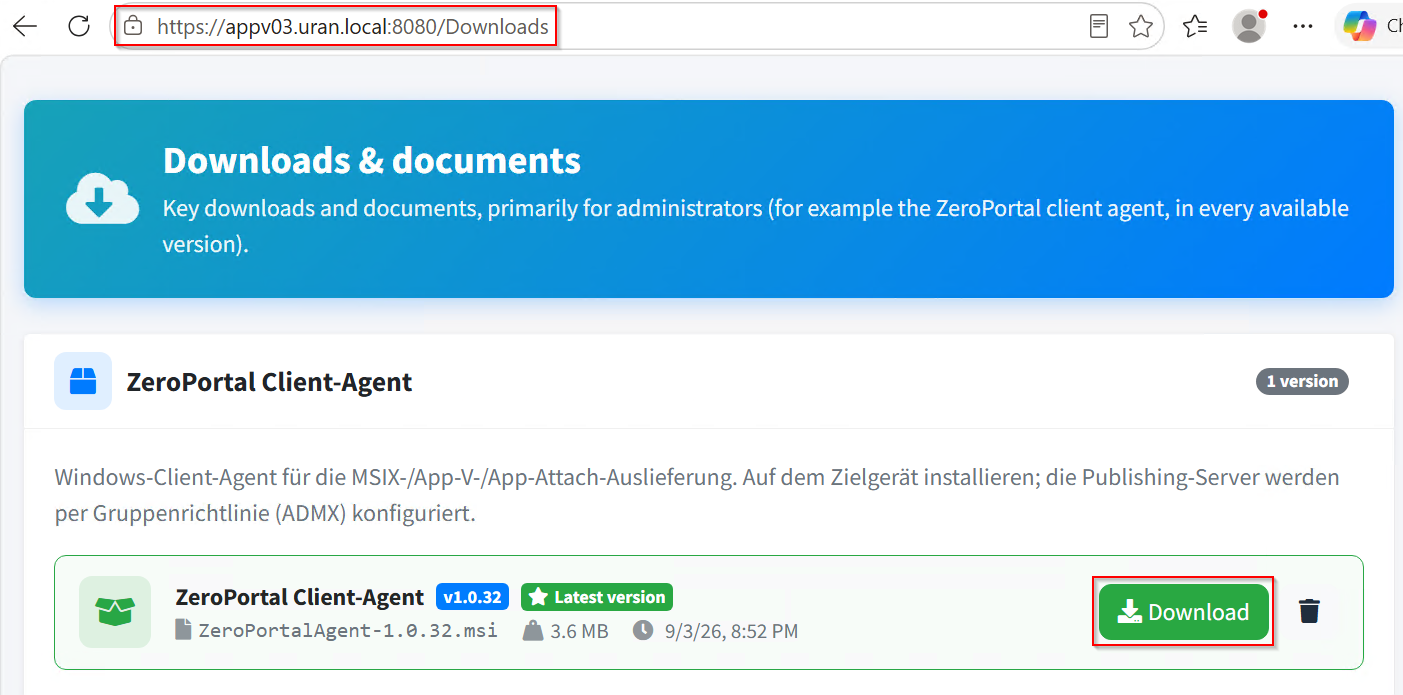
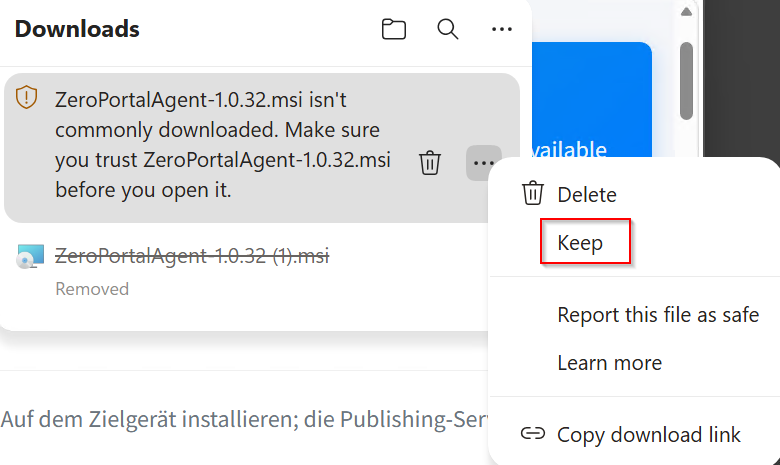
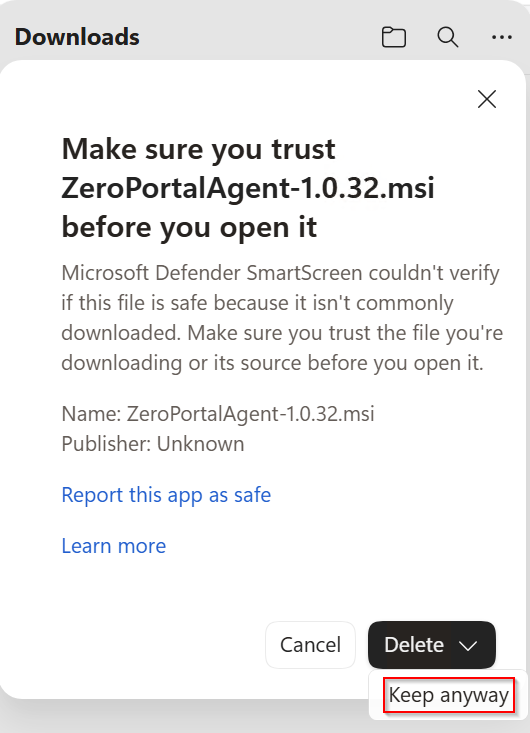
Edge and SmartScreen warn about a rarely downloaded file: Keep and Keep anyway. For regular downloads, exempt the portal's domain by policy (section 3.2).
3.2 Preparing the browser: intranet zone and SmartScreen
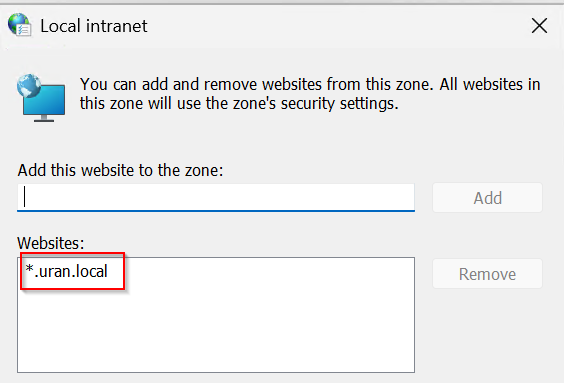
Intranet zone. For the browser and the agent to sign in via Kerberos without a login window, the portal URL belongs in the Local Intranet zone. A login window despite correct permissions is almost always this missing zone mapping (missing permissions show up as "no access"). By GPO: User Configuration → Administrative Templates → Windows Components → Internet Explorer → Internet Control Panel → Security Page → Site to Zone Assignment List, portal FQDN with value 1; this also applies to Edge and Chrome. An SPN is only needed if the portal is reached under an alias name (Known issues).
SmartScreen. GPO Computer Configuration → Administrative Templates → Microsoft Edge →
SmartScreen settings → Configure the list of domains for which Microsoft Defender
SmartScreen won't trigger warnings (registry:
HKLM\SOFTWARE\Policies\Microsoft\Edge\SmartScreenAllowListDomains, value 1 = portal
FQDN). If Edge reports "unsafe download blocked", the portal was opened over HTTP instead
of HTTPS.
3.3 Group policies (ADMX/ADML)
Where do I find the template? It is installed with the agent and sits on every device
with the agent under C:\Program Files\NickIT\ZeroPortalAgent\admx: the file
ZeroPortalAgent.admx plus the language folders de-DE and en-US with the matching .adml
files. There is no separate download — install the agent once on any machine (the portal
server works too) and take the files from there.
How do I install it? Copy the .admx into your domain's central store
(\\<domain>\SYSVOL\<domain>\Policies\PolicyDefinitions) and the .adml files into the
language folders of the same name below it. Without a central store, put the same files under
C:\Windows\PolicyDefinitions on the machine where you edit the policy. Replace the files when
a new agent version ships. The settings then appear under Computer Configuration →
Administrative Templates → NickIT → ZeroPortal Agent.
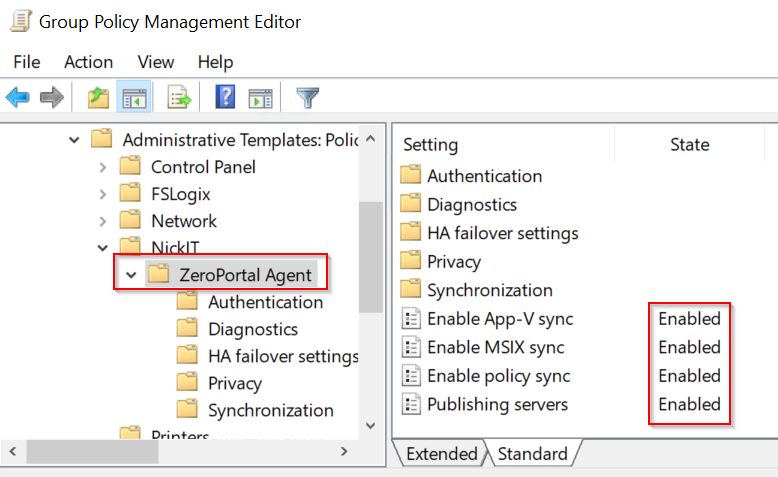
What can be configured? 26 settings, all machine-wide. The ZeroPortal Agent folder holds
the four most important ones, the rest sit in the subfolders: Servers (failover, random
selection, timeouts), Sync (intervals, retries, package source, machine and user sync, start
the tray icon automatically), Diagnostics (log level and log path), Authentication
(enrollment token) and Privacy
(anonymize names in the log). Every setting writes a value under
Software\Policies\NickIT\ZPAgent\…; the full list with registry names and defaults is in
sections 6.1 and 6.2. A setting delivered by group policy always wins over a local value
(section 4.1). Without group policy you set the same things locally in PowerShell
(section 3.7).
The four most important settings decide everything else. They sit directly in the ZeroPortal Agent folder.
| Setting | What it does |
|---|---|
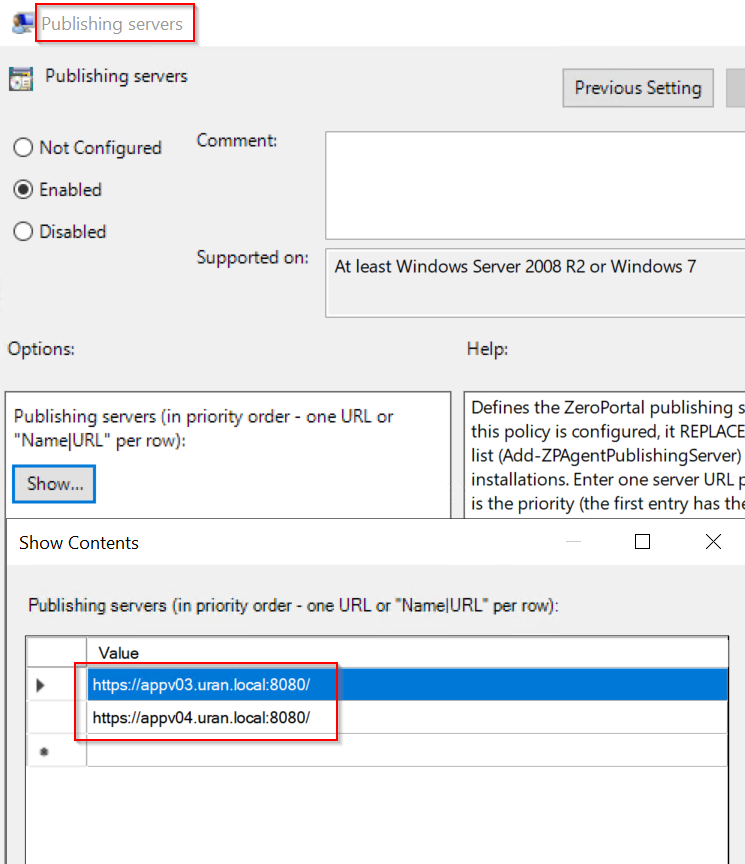
| Publishing servers | The portal URLs, one per line, optionally as Display name\|https://server:port. The order is the priority. Without this, the agent doesn't know whom to ask. A configured list replaces any locally entered one. |
| Enable MSIX sync | The agent delivers MSIX packages and App Attach. |
| Enable App-V sync | The agent delivers App-V packages and connection groups. See the warning below. |
| Enable policy sync | The agent applies ZeroPortal policies: drives, printers, desktop, scripts, and the other templates. |
After installation, all three sync areas are off: the agent connects to the portal but delivers nothing. Turn on only what you really need.
Keep App-V sync off when the Microsoft App-V client fetches the packages. There are two ways to do App-V, and only one may be active on a device. Either the Microsoft App-V client queries the portal itself as its publishing server — then Enable App-V sync stays off. Or the ZeroPortal agent handles the App-V packages — then enter no publishing server in the Microsoft client. If both run, they publish and remove the same packages in turn: shortcuts disappear and come back, and the log entries chase each other. MSIX and policies are not affected; they may run side by side.
With your own PKI, distribute the portal's server certificate with the same GPO into the computer's Trusted Root Certification Authorities store; the service runs as System and does not see user certificates.
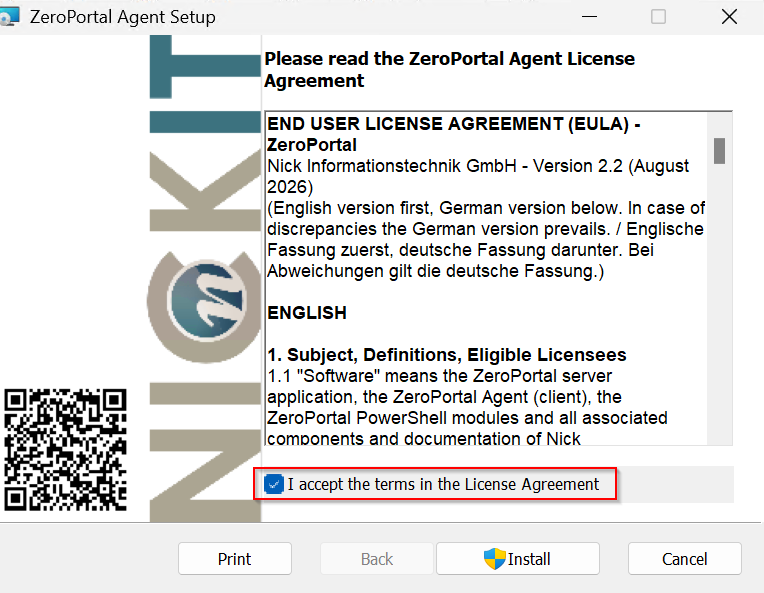
3.4 Installing the agent
msiexec /i ZeroPortalAgent-<Version>.msi /qn
The service starts right away, the first machine sync runs about 30 seconds later, and the tray icon appears in every signed-in session. No restart is needed.
You only need MSI parameters if you work without group policy (test, workgroup):
| Parameter | Meaning |
|---|---|
SERVER=https://portal:8443 |
Portal URL as entry 1 of the local server list; SERVERNAME= sets the display name (default ZeroPortal) |
MSIXSYNC=1, APPVSYNC=1, POLICYSYNC=1 |
Turn on the three sync areas. They survive a later upgrade without the parameters |
ENROLLTOKEN=zpe_… |
Enrollment token for devices without a domain (Devices without a domain (API key)) |
TRUSTCERT=1 |
Adopt the portal certificate into the computer store at first contact if its chain cannot be validated (test only) |
NOTRAY=1 |
No tray icon, and therefore no notification cards (Agent/TrayAutostart=0) |
NOTOASTS=1 |
Tray icon without notification cards (Agent/ToastMode=Off) |
Upgrade. A newer MSI installs over the existing version; the service and tray restart in the process. For a big version jump, or if an upgrade rolls back with error 1603: uninstall the old version, then install the new MSI. Avoid series of installs and service restarts minutes apart (section 5.2).
3.5 First check
On the client, in an administrative PowerShell session:
Get-ZPAgentStatus                 # service reachable, version, server list
Get-ZPAgentSync                   # which areas are on, and where the value comes from
Sync-ZPAgentPublishingServer      # trigger a sync right now
Get-ZPAgentPackage                # packages managed by the agent
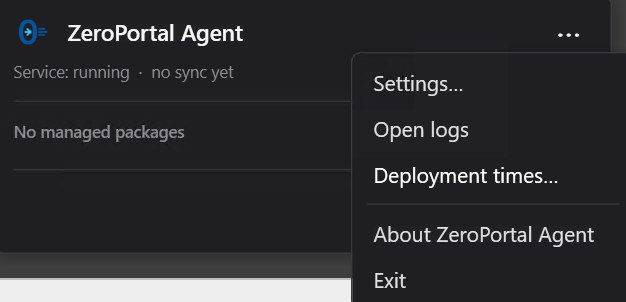
The user sees the same in the tray icon: Sync now, Show packages…, Open logs, Deployment times…, and Settings… (central settings take precedence).
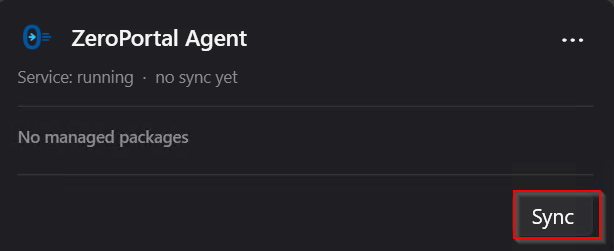
After the first sync, the device appears in the portal on the Global Configuration → Agent enrollment page, on the Known clients card.
3.6 Changing settings
The rule of thumb: what the agent needs to start comes from group policy. How it behaves in operation comes from a policy in the portal.
Group policy offers 26 settings, the portal policy reaches all 57 switches. Only group policy has the publishing servers and the enrollment token — the agent needs both before it can reach a portal at all. Conversely, 34 switches have no entry in the template, among them the App Attach mount path, the rules for removal, downgrade and self-healing, and the tray behaviour; set those through the portal policy or locally. Appendix 6.1: if the ADMX column names a setting, it also works by group policy.
- Group policy (ADMX) for the server list, failover, timing, the three sync switches, and logging. Always wins.
- ZeroPortal policy of type Agent configuration in the portal (template Agent configuration, see Policies and templates): reaches every switch in the catalogue. Takes effect at the next sync; a value later removed from the policy is reset on the device.
- PowerShell, locally, with
Set-ZPAgentConfiguration -<switch> <value>; every switch is its own parameter, and tab completion lists them all:
Get-ZPAgentConfiguration                                 # all switches: name, value, SetByGroupPolicy, area
Get-ZPAgentConfiguration -SyncIntervalMinutes            # just this switch
Set-ZPAgentConfiguration -SyncIntervalMinutes 30
Set-ZPAgentConfiguration -LogLevel Debug
Enable-ZPAgentSync -Msix -Policy                         # turn sync areas on locally

3.7 Publishing servers without group policy
Add-ZPAgentPublishingServer -Name 'ZeroPortal' -Url 'https://portal:8443'
Get-ZPAgentPublishingServer
Remove-ZPAgentPublishingServer -Name 'ZeroPortal'
The local list only applies while no GPO list is configured; once the GPO applies, the local list is ignored (not deleted).
3.8 Changing the App Attach mount path
MSIX/AppAttachMountRoot sets where App Attach images (VHDX/CIM) are mounted; empty means
C:\ProgramData\NickIT\AppAttach. If the path is unusable (drive missing), the agent
falls back to the default (event 3535). A change remounts every App Attach package under
the new path at the next sync and registers it again — so do it in a maintenance window:
Set-ZPAgentConfiguration -AppAttachMountRoot 'D:\AppAttach' (or the Agent
configuration policy), Stop-Service ZeroPortalAgent, restart. Mounts do not survive a
restart; the agent clears out empty folders of the old path at startup.
3.9 Site-local package source
MSIX/MSIXPackageRoot (ADMX: Package source root override) replaces the prefix
\\server\share of the catalogue URL with a local path or DFS path; the rest of the path
stays. Applies to MSIX bits and App Attach images. If a package is missing there, the
agent loads it from the original source.
4. Rules: when does what apply
4.1 Order of precedence for settings
When reading settings: group policy before the Agent configuration policy before
the local value (PowerShell, MSI parameters) before the built-in default. If a
switch is set by GPO, Set-ZPAgentConfiguration and Enable-ZPAgentSync have no visible
effect; Get-ZPAgentConfiguration shows this in the SetByGroupPolicy column.
4.2 Timing
| Action | When |
|---|---|
| Machine sync after start | about 30 s after the service starts, no random offset |
| Recurring machine sync | every MSIX/SyncIntervalMinutes (60) plus 0 to Agent/SyncJitterMinutes (10) random |
| User sync | at sign-in and unlock, then at the same interval as the machine sync |
| Policy refresh (policies only) | first 2 min after the service starts, then every Policy/RefreshMinutes (90) |
| Deferred uninstalls | 5 min after the service starts, then every MSIX/SweeperIntervalHours (4) |
| No server reached | machine sync retries after Agent/SyncFailureRetryMinutes (5) until a server answers; user sync at the next trigger |
| Server unreachable (failover) | after Agent/FailoverTimeoutSeconds (10 s), the next server; the failed one is avoided for Agent/ServerBlacklistMinutes (10), and the blacklist is cleared at every service start |
A new interval applies after the next run; Periodic user sync, Log level, and Alternative log path at the next service start or user sync.
4.3 Server list and failover
- The GPO list is authoritative. After a change:
gpupdate /forceon the client; the agent reads the list at the next sync (or right away withSync-ZPAgentPublishingServer). - Failover (default): the list is a priority chain of identical replicas. The first server to answer within the failover timeout counts as the complete view; the cleanup run follows its catalogue. Only servers with the same catalogue belong in one list.
- Merge-all (failover off): every server is contacted and the content is merged. Only for independent portals. If one does not answer, the cleanup run is skipped (event 3500), so no package from a failed server gets removed.
- Random server selection spreads the load: per run, the agent starts at a random server from the list.
- A server that answers with an error (403, 500) counts as reachable and does not land on the blacklist; the agent tries the next one.
4.4 Removal, downgrade, format switch
- Nothing is removed without server contact. If a fetch fails, everything stays as it is.
- A package missing from the catalogue is removed at the next sync
(
MSIX/AutoUninstallOnUnpublish;MSIX/ManagedPackageMissThreshold= number of syncs it must be missing for).MSIX/GlobalRemovalPolicy:Immediateright away,WhenIdleandOnRebootmark it and remove it later or at the next service start,Disabledonly watches. If the application is running, removal is deferred (MSIX/DeferRemovalWhileInUse), and happens at the latest afterMSIX/RemovalIdleTimeoutHours(24). - Downgrade is off (
MSIX/AllowDowngrade): a newer local version counts as satisfied (event 2538 or 3510). A Package downgrade control policy per package family takes precedence (Distributing MSIX packages). - Format switch MSIX ↔ App Attach: the agent closes the running application and
registers the package again (
MSIX/TerminateAppsForFormatSwitch); off = the switch waits while it runs (event 3544). - Turning a sync area off (MSIX, App-V, policies) leaves what was already delivered unchanged.
- Sweep of orphaned shortcuts:
Agent/ShortcutSweepModeOff(default),ZeroPortal(own packages only),All(all local ones).
4.5 Offline: notebooks and mobile devices
| Delivery | Without portal and share |
|---|---|
| MSIX (installed locally) | runs without restriction |
| App-V, fully loaded | runs without restriction |
| App-V, partly streamed | only the part already loaded; before travelling, load the package fully from the tray |
| App Attach (VHDX/CIM from the share) | does not run: the package is mounted from the share, not copied |
Practical rule: mobile devices get MSIX or fully loaded App-V, not App Attach.
- Policies stay at the last applied state (offline cache, event 3600); an entry is only taken back when a reachable server reports that it is gone.
- Licence: the receipt lasts 90 days and is renewed once 28 days remain. Notices such as "no licence free" only follow a real server answer, at most every 4 hours. Only when the receipt has expired and the portal stays unreachable does the user see a notice; the applications keep running either way.
- Back online, the first successful sync catches up on everything: packages, policies, licence renewal.
5. Operations and troubleshooting
5.1 Logs
| What | Where |
|---|---|
| Service (machine sync) | C:\ProgramData\NickIT\ZeroPortalAgent\Logs\agent-<YYYYMMDD>.log, one file per day |
| User sync | usersync-<username>-<YYYYMMDD>.log in the same folder; if the user cannot write there, under %LocalAppData%\NickIT\ZeroPortalAgent\Logs |
The agent writes only to these text files, not to the Windows event log. Every line carries
a timestamp, a level (INF, WRN, ERR), and the event ID in square brackets (appendix
6.4); each sync ends with a summary of counters and the names of failed packages.
- Detailed diagnostics:
Set-ZPAgentConfiguration -LogLevel Debug(or GPO Log level), applies at the next service start or user sync; set it back toInformationafterwards. - A different location:
Agent/LogPath(GPO Alternative log path). The service and the user must be able to write there, otherwise the respective log is silently dropped. Clear-ZPAgentLogdeletes all agent logs; there is no automatic rotation.- The user reaches the folder through Open logs in the tray menu; Deployment times…
shows how long packages and policies took (
Agent/DeploymentReport). - The ADMX setting Do not write user names to the agent log (folder Privacy) is not evaluated yet in this version.
5.2 Running it stably and finding faults
Every service start remounts all App Attach images and runs a full sync. Installs,
uninstalls, or service restarts minutes apart cause mount/unmount churn in which modern
apps (Task Manager, Start menu) can crash at launch — temporarily, with no lasting damage.
So: after an install, wait for the first sync; while testing, stop the service between
changes (Stop-Service ZeroPortalAgent) instead of quickly restarting it; on test devices
with many App Attach packages, throttle the periodic sync
(Agent/MachineSyncPeriodicEnabled=0 or a larger MSIX/SyncIntervalMinutes). If it
happens: stop the service, restart the device.
| Symptom | Cause | Fix |
|---|---|---|
| Agent installed, nothing happens | Sync areas off out of the box; no server list | Get-ZPAgentSync, Get-ZPAgentStatus; set the GPO Enable … sync settings and Publishing servers, gpupdate /force, Sync-ZPAgentPublishingServer |
| Log: 3506 / 3516 "reached NO publishing server", 2108 "short retry" | Portal unreachable, name does not resolve, certificate not trusted, port closed | Test the URL from Get-ZPAgentStatus in the client's browser; certificate chain in the computer store; firewall to the portal port |
| Log: 3503 / 3513 server on the blacklist although it is running | Under load, the server answers more slowly than the failover timeout | Raise Agent/FailoverTimeoutSeconds; the block expires after Agent/ServerBlacklistMinutes or at the next service start |
| Log: 3504 / 3514 "answered with an error" | Portal reachable but refuses (permissions, Kerberos) | Check the portal log and permissions; check clock skew and SPN (Known issues) |
| Login window when opening the portal; Edge blocks the MSI | Portal URL not in the intranet zone; SmartScreen, or opened over HTTP | Section 3.2 |
| Service does not start | Startup error | Search agent-<date>.log for event 4000; also the Windows event log (.NET Runtime, Application Error) |
| Package stays installed despite being retracted | Cleanup run skipped because a server did not answer (3500) | Make the server reachable; with independent portals keep every server reachable, or use failover |
| Package is not removed, tray shows the removal as scheduled | Application running; removal deferred (WhenIdle/OnReboot) |
Wait for RemovalIdleTimeoutHours, run Invoke-ZPAgentPendingRemoveSweep, or restart |
| An older version is not installed (2538 / 3510) | Downgrade not allowed | MSIX/AllowDowngrade, or the Package downgrade control policy for the package family |
| App Attach application does not start after a restart (3532 / 3533) | Image not yet reachable after the restart (share, network) | The service keeps retrying the mount; check the share and the computer account's permissions; no App Attach for mobile devices |
| Log: 3535 mount path unusable | MSIX/AppAttachMountRoot points at a missing drive |
Correct or clear the path (section 3.8) |
| Log: 3620 / 4531 "falling back to MSIX" | No App Attach image in the requested format, or mounting failed | Create the image in the portal (Distributing MSIX packages); check the share |
| Log: 3410 "deployment took … s" | Signature checking waits on internet lookups (intermediate certificate, revocation lists); typical for devices without internet | The message names the cause; the settings in Known issues cut the time from minutes to seconds without weakening signature checking |
| Notice "No more licences are free for you" | Licence volume used up; applications still run | Check licensing in the portal (Users, permissions, licences and logs) |
| A new AD group membership only applies after signing out and back in | The user's Kerberos ticket does not contain the group yet | Agent/PurgeUserTicketsBeforeSync=1 (GPO Purge the user's Kerberos tickets before a user sync), mind the side effects |
| Modern apps crash at launch | Mount churn from restart series (see above) | Stop the service, restart the device |
6. Appendix: technical reference
6.1 Switches
The switches an administrator typically changes. Settable by GPO (column "ADMX"), by the
Agent configuration policy, or locally with Set-ZPAgentConfiguration -<switch> <value>.
Get-ZPAgentConfiguration on the device gives the full list with current values; every
switch is a parameter of Set-ZPAgentConfiguration.
| Switch | Area | Default | ADMX | Meaning |
|---|---|---|---|---|
MSIXSyncEnabled |
MSIX | off | Enable MSIX sync | MSIX and App Attach sync (computer and user) |
AppVSyncEnabled |
AppV | off | Enable App-V sync | App-V packages and connection groups for computer and user |
PolicyProcessingEnabled |
Policy | off | Enable policy sync | Fetch and apply ZeroPortal policies |
SyncIntervalMinutes |
MSIX | 60 | Sync interval | Interval for machine and user sync (5 to 1440) |
MSIXPackageRoot |
MSIX | empty | Package source root override | Site-local package source (section 3.9) |
AppAttachMountRoot |
MSIX | empty | – | Mount point for App Attach images; empty = C:\ProgramData\NickIT\AppAttach |
AllowDowngrade |
MSIX | off | – | Put an older version over an installed newer one; a policy per package family takes precedence |
GlobalRemovalPolicy |
MSIX | Immediate |
– | Immediate, WhenIdle, OnReboot, Disabled |
DeferRemovalWhileInUse |
MSIX | on | – | Defer removal while the application runs |
RemovalIdleTimeoutHours |
MSIX | 24 | – | Remove after n hours at the latest |
ServerFailover |
Agent | on | Server failover mode | Priority chain of identical replicas; off = merge-all |
FailoverTimeoutSeconds |
Agent | 10 | Field in Server failover mode | Wait per server for an answer (1 to 300) |
RandomServer |
Agent | off | Random server selection | Random start server per run |
ServerBlacklistMinutes |
Agent | 10 | Server blacklist duration | Avoid a failed server this long; 0 = off |
PurgeUserTicketsBeforeSync |
Agent | off | Purge the user's Kerberos tickets before a user sync | klist purge before every user sync |
TrustServerCertificate |
Agent | off | – | Adopt the portal certificate at first contact (MSI TRUSTCERT=1, test only) |
LogLevel |
Agent | Information |
Log level | None, Error, Warning, Information, Debug |
LogPath |
Agent | empty | Alternative log path | A different folder for the logs |
6.2 Registry
Three roots: GPO = HKLM\SOFTWARE\Policies\NickIT\ZPAgent (wins when read; the agent
reads every catalogue key here, even ones without an ADMX entry), Local =
HKLM\SOFTWARE\NickIT\ZPAgent (PowerShell, MSI parameters, Agent configuration policy),
User = HKCU\SOFTWARE\NickIT\ZPAgent.
| Root | Subkey | Content |
|---|---|---|
| GPO | \Servers |
Value names 1, 2, 3 … (priority), data URL or Name\|URL |
| GPO | \Agent, \MSIX, \AppV, \Policy |
The switches in the ADMX column of 6.1 |
| GPO | \Auth |
EnrollmentToken (enrollment token) |
| GPO | \Privacy |
AnonymizeLogNames (no effect in this version) |
| GPO | \UI |
Tray defaults Language, Theme, ShowFrameworks, ShowTooltips; no ADMX entry, by hand only |
| Local | \Agent, \MSIX, \AppV, \Policy |
Local values of the same switches |
| Local | \Auth |
ApiKey (device key, DPAPI-protected), EnrollmentToken (MSI), ApiKeySeed (MSI APIKEY=, adopted and deleted at the first service start) |
| Local | \Servers\<No> |
Url, Name, GlobalRefreshEnabled, UserRefreshEnabled, RequestTimeoutSec |
| Local | \ServerBlacklist |
Value name = server number, data = expiry (UTC ticks) |
| Local | \MSIX\ManagedPackages\<Family> |
Machine-wide managed MSIX and App Attach packages |
| Local | \AppV\ManagedPackages, \AppV\ManagedGroups, \AppV\ManagedUserPackages\<SID>, \AppV\ManagedUserGroups\<SID> |
App-V packages and connection groups published by the agent (computer, or per user) |
| Local | \AppliedPolicies\AgentConfig |
State before an Agent configuration policy, for resetting |
| Local | \UI |
Tray defaults for every user of the device |
| User | \Agent |
DisplayName (the user's display name in the portal) |
| User | \Auth |
ApiKey (user key of local accounts, DPAPI-protected) |
| User | \MSIX\UserRegistrations\<Family> |
Packages registered for the user |
| User | \UI |
The user's tray settings: Language, Theme, ShowFrameworks, ShowTooltips |
The tray icon has no autostart entry under Run; the service starts it
(Agent/TrayAutostart). Values set by ZeroPortal policies (drives, registry, shortcuts …)
live at their respective targets, not under ZPAgent.
6.3 Cmdlets of the ZeroPortalAgent module
Short overview; parameters, outputs and examples are in Agent cmdlets (PowerShell).
| Cmdlet | Purpose |
|---|---|
Get-ZPAgentStatus |
Service reachable, versions, machine sync state, server list |
Sync-ZPAgentPublishingServer [-Method All\|Computer\|User] |
Trigger a sync; without -Method the sync switches apply, with -Method the run is forced. Alias Invoke-ZPAgentSync |
Get-ZPAgentConfiguration [-MSIX] [-AppV] [-Agent] [-Policy] [-<switch>] |
Effective values with SetByGroupPolicy |
Set-ZPAgentConfiguration -<switch> <value> |
Write a local value (HKLM, elevated rights) |
Enable-ZPAgentSync / Disable-ZPAgentSync -Msix -AppV -Policy -All |
Switch sync areas locally |
Get-ZPAgentSync |
The three areas with state and source (GPO, local, default) |
Add- / Set- / Get- / Remove-ZPAgentPublishingServer |
Local server list |
Set-ZPAgentDisplayName -Name <text> [-Scope User\|Machine] |
Display name in the portal (users without elevated rights) |
Get-ZPAgentPackage [-Machine] [-User] |
Packages managed by the agent |
Get-ZPAgentMountedPackage [<Family*>] |
Which image an App Attach package actually uses |
Invoke-ZPAgentPendingRemoveSweep |
Run deferred uninstalls now |
Clear-ZPAgentLog |
Delete the agent logs |
6.4 Event IDs in the agent log (selection)
| ID | Level | Meaning |
|---|---|---|
| 2100 | INF | Service start: machine sync schedule |
| 2101 / 2519 / 2601 | INF | Machine sync, user sync, user sync task finished (with counters) |
| 2108 | INF | No server reached, short retry scheduled |
| 2500 / 2510 | INF | Catalogue fetched from the server (computer / user); 2510 also: key received via enrollment token |
| 2507 / 2516 | INF | Framework still needed and stays (computer / user) |
| 2538 | INF | Newer version already installed, requirement counts as met; also a user registration switched to App Attach |
| 2541 | INF | Permitted downgrade, the newer version is removed first |
| 2605 | INF | The user's Kerberos tickets purged before the sync |
| 2701 / 2702 / 2703 / 2704 | INF/WRN | App-V sync off, App-V client missing, catalogue fetched, fetch failed |
| 3410 | WRN | Deployment took longer than SlowDeployWarnSeconds (30), with cause (certificate chain, revocation lists) |
| 3500 | WRN | Cleanup run skipped because a fetch failed |
| 3503 / 3513 | WRN | Server unreachable, put on the blacklist (computer / user) |
| 3504 / 3514 | WRN | Server answered with an error, or no server enabled for this run |
| 3505 / 3515 | WRN | No server reachable, run is retried |
| 3506 / 3516 | WRN | No server reached, offline cache in use (computer / user) |
| 3510 | WRN | Local version newer, downgrade not allowed |
| 3532 / 3533 | WRN | App Attach image missing or unreachable, retrying |
| 3535 | WRN | Mount path unusable, falling back to the default |
| 3541 | WRN | Downgrade not possible, the newer version could not be removed |
| 3544 | WRN | Format switch postponed, application running |
| 3600 | WRN | Policy fetch failed, offline cache in use |
| 3620 | WRN | App Attach requested, no image in the requested format, falling back to MSIX |
| 4000 | ERR | Service could not start (full cause) |
| 4100 / 4110 | ERR | Scheduled run crashed / user sync task could not be created |
| 4500 / 4510 | ERR | Catalogue fetch failed (computer / user) |
| 4501 / 4511 | ERR | Package deployment failed (computer / user), with error code |
| 4502 / 4512 | ERR | Package removal failed (computer / user) |
| 4531 | ERR | Mounting an App Attach image failed, falling back to MSIX |
| 4600 / 4601 / 4602 | ERR | Policy package invalid, policy processing failed (computer / user) |
| 4610 / 4611 | ERR | Registry policy could not be set / taken back |